Microsoft Defender for Endpoint Onboarding: What They Don't Tell You in the Docs

Updated: Jun 24
The onboarding completed. Every device shows "healthy" in the Defender portal. The dashboard is green. The security team closes the project and moves on.
A few weeks later, a business user's Windows 11 laptop gets hit with malware. The device was onboarded. It was reporting healthy the whole time. So, what happened?
This is the gap between onboarded and defended, and the documentation does not make it obvious.
Onboarded is not defended
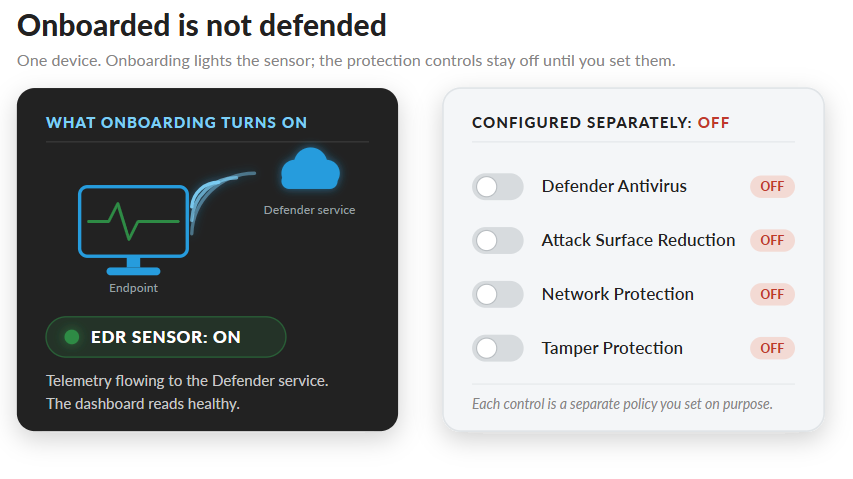
Onboarding a device to Microsoft Defender for Endpoint does one thing: it turns on the sensor that sends telemetry to the Defender service. That's it. Microsoft's own Intune deployment guidance is direct about this. Onboarding "enables telemetry flow, but doesn't configure advanced settings such as attack surface reduction, firewall, or antivirus policies."
So, a healthy device tells you the sensor works and data is flowing. It does not tell you the device can stop an attack.
MDE has four parts that do the actual defending:
Defender Antivirus, which scans and blocks files
Attack Surface Reduction rules
Network Protection
The EDR sensor
Onboarding lights up the last one. The first three are separate policies you configure on purpose. If you skip them, you have a device that watches an attack happen and reports it in detail, without stopping it.
The five gaps that cause real exposure
Five gaps account for most of the exposure I find after a "finished" onboarding.
1. Antivirus is in passive mode or missing. If a third-party AV is still installed on an onboarded device, Defender Antivirus runs in passive mode. Passive mode scans and reports but does not block. It also still needs signature, platform, and Sense agent updates to function. A device with no active AV and no working third-party AV is onboarded and reporting, with nothing blocking files on disk.
2. ASR rules are in audit mode, or never deployed. Audit mode logs what a rule would have blocked and sends it to Advanced Hunting. Teams turn rules to audit during testing, the rollout closes, and the rules never move to block. Audit mode produces detection events while blocking nothing, so the volume is easy to mistake for coverage.
3. Legacy AV exclusions get carried over without review. When you migrate off a third-party product, people copy the old exclusion list into Defender to avoid breaking anything. Those exclusions often cover paths an attacker uses. You inherit the previous product's blind spots and call it a migration.
4. Policy conflicts leave settings undefined. Settings can come from Group Policy, Intune, Configuration Manager, local policy, and PowerShell. When two sources disagree, the result is not always what the portal shows. A setting can read as configured in one console and be overridden somewhere else. You find out during an incident.
5. Validation never happened. Nobody ran the detection test. Nobody confirmed the ELAM driver loaded. On Server 2016 and 2012 R2, nobody checked the servicing stack and cumulative updates the modern sensor needs. The project closed on "all green" without a single test that proves the green means anything.
What the gap costs
Here is what this looked like in practice.
A group of devices got onboarded to MDE. The security team saw healthy status across the board and presumed the endpoints were protected. Two things were true. There was no consistent configuration across the devices, and active antivirus protection was missing or inconsistent on some of them.
A business user's Windows 11 device picked up malware. Containment and remediation followed. The infection spread to other systems before it was fully contained, and that spread is what triggered a full review and assessment of the MDE configuration. The onboarding had been "done" for weeks.
For a CISO, the cost is not abstract. MDE Plan 2 comes with Microsoft 365 E5. Plan 1 comes with E3. Either way, the license is already paid for. An onboarding that stops at telemetry is paying full price for a fraction of what the license covers, and carrying the risk of believing the endpoints are defended when they are not. The return on that license shows up only when the protection controls are configured and validated, not when the sensor reports in.
There is also a containment risk worth naming. If Live Response is enabled and device groups are flat, an operator or a compromised operator account can reach domain controllers and other Tier-0 systems directly. Scope device groups and Live Response permissions so that high-value systems sit behind their own controls.
The post-onboarding checklist
Onboarding is the start of the work. Here is what closes the gap between healthy and defended.
Set Defender Antivirus to active mode. Confirm it is not sitting in passive mode behind a third-party product, and that signature and platform updates are current.
Move ASR rules from audit to block. Decide which rules block, test them on a ring, and promote them. Audit is a testing state, not a finished one.
Review every inherited AV exclusion. Treat the legacy exclusion list as a question, not an answer. Remove anything you cannot justify.
Resolve policy sources. Pick where endpoint settings come from and remove the conflicts. Confirm the effective setting on the device, not just the value in one console.
Confirm the effective state. Run the detection test. Check Defender Vulnerability Management security recommendations for the onboarded devices and confirm the protection controls report compliant, not just the onboarding control.

Roll out in rings. Pilot, then Ring 1, then broad. Validate protection and check for conflicts at each ring before you widen. Use Unified RBAC in Defender XDR to scope who can change what.
The work starts at healthy
A green dashboard means the sensor is reporting. It is the first checkpoint. The protection that stops an attack, active antivirus, ASR rules in block mode, clean exclusions, resolved policy, and real validation, is separate work that you do on purpose after the device goes healthy.
Treat onboarding as step one. The defending starts after.
Does "Healthy" in Defender Mean Your Endpoints Can Stop an Attack?
Cloud Harbor Consulting partners with security architects and technical leadership teams to turn a finished Microsoft Defender for Endpoint onboarding into endpoints where the protection controls are configured and validated, not just reporting telemetry. Schedule a conversation to walk the post-onboarding checklist and pinpoint where passive-mode antivirus, audit-mode ASR rules, or inherited exclusions are leaving exposure on the table.
Comments