Conditional Access Named Locations: Common Mistakes and How to Audit Them

Most Conditional Access rollouts get one pass at Named Locations: someone builds a list of office IP ranges, marks the corporate range as trusted, ships the policy, and moves on. Nobody revisits it. Two years later, the subnet that used to be "the Chicago office" has been reassigned to a different tenant in the same office park, and Conditional Access is still treating it as trusted.
A named location is live trust logic that Microsoft Entra ID evaluates on every sign-in and every token refresh. Networks change. IP ranges get reassigned. Remote work reroutes traffic through proxies nobody accounted for. The policy doesn't know any of that happened. It keeps trusting what it was told to trust.
I worked with a client who couldn't explain why certain sign-in activity was bypassing Conditional Access entirely. Users authenticating from network ranges that should have triggered MFA weren't getting prompted. The cause was the named location itself: a long list of IPv4 CIDR entries that had accumulated over time, some inaccurate, some missing, some pointing at ranges the organization no longer controlled. On paper, the policy looked complete. In practice, it had stopped matching the network it was built to describe.
What a named location actually is
A named location in Microsoft Entra ID is one of two things: an IPv4/IPv6 address range in CIDR notation, or a country/region determined either by IP address or by GPS coordinates from the Microsoft Authenticator app. Conditional Access policies reference these locations under the Network condition, either including them ("apply this policy only from these locations") or excluding them ("apply this policy everywhere except these locations").
Marking a location trusted does more than change how a single policy behaves. It also feeds Microsoft Entra ID Protection's risk calculation: a sign-in from a trusted location is treated as lower risk across the board, not just within the policy where you set the flag. That's easy to miss if you mark a location trusted to satisfy one MFA exclusion and don't realize it's now shaping risk scoring tenant-wide.
There are hard limits worth knowing before you scale a named-location strategy: no more than 195 named locations per tenant, no more than 2,000 IP ranges per location, and only CIDR masks greater than /8 are permitted. Organizations that try to enumerate every branch office and partner network as separate named locations hit these ceilings faster than they expect.
Six ways named locations quietly fail
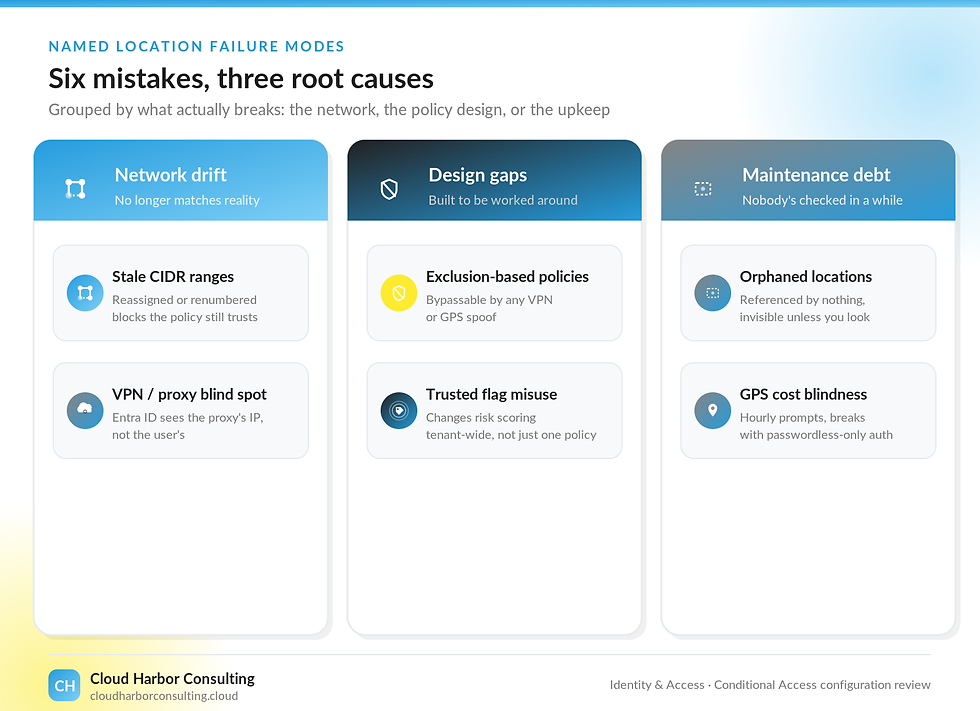
Stale CIDR ranges. This is the client example above, and it's the most common failure I see. A named location built years ago from a spreadsheet of office IP ranges doesn't get revisited when an ISP reassigns a block, a branch office closes, or a range gets renumbered. The policy keeps running. It's just matching the wrong network.
The cloud proxy and VPN blind spot. When traffic passes through a cloud-hosted proxy or VPN, Microsoft Entra ID sees the proxy's IP address, not the user's. The X-Forwarded-For header isn't trusted for this evaluation, because there's no way to confirm it wasn't forged. Every user behind the same corporate VPN concentrator looks identical to Conditional Access, and keeping that proxy's IP range current becomes its own maintenance burden. Microsoft's own guidance here is to use Global Secure Access source IP restoration rather than hand-maintaining the proxy's IP range indefinitely.
Exclusion-based location policies. A policy that blocks access except from named locations is bypassable. A VPN that egresses from an approved country, or a GPS spoofing tool, defeats it without much effort. Inclusion-based design, where a policy applies only from explicitly approved locations, closes that gap. It takes more upfront work to map, which is exactly why it gets skipped.
The trusted flag applied without thinking through the blast radius. Marking a location trusted to make one policy behave correctly can change how Identity Protection scores risk everywhere else. Every trusted flag should be a deliberate decision.
Orphaned named locations. A location built for a policy that was later deleted or restructured doesn't disappear on its own. It sits in the tenant, unreferenced, invisible unless someone specifically checks for it. Its presence is a signal: nobody has audited Conditional Access configuration recently.
GPS-based location cost blindness. Country-by-GPS locations depend on the Microsoft Authenticator app checking in with the user's device, sometimes hourly, and don't work at all if the user is on a passwordless-only authentication method. Turning this on without accounting for that operational cost produces a wave of help desk tickets and a policy people learn to work around.
What this costs you
Run the client's stale-CIDR example forward: MFA and access controls weren't firing for sign-ins the organization believed were covered. That's dwell time that starts the moment the gap opens and doesn't stop until someone finds it. The expensive part is the false confidence: a compliance report, a board update, or an insurance questionnaire that says Conditional Access enforces MFA off-network, when it hasn't for however long the gap went unnoticed.
Orphaned named locations point at the same risk from a different angle. Before Microsoft fully retired the legacy Azure AD Graph API in 2025, Secureworks' Counter Threat Unit found that Conditional Access policy changes made through that API didn't generate a matching entry in the Conditional Access audit log, only in the broader Core Directory log, and without the same level of detail. That specific path is closed now, but the lesson isn't: an organization that only reviews the log it expects to see can miss a policy change entirely. An unreviewed set of named locations is the same failure mode, configuration that exists, functions, and never gets checked against what it's supposed to be doing.
How to audit your named locations
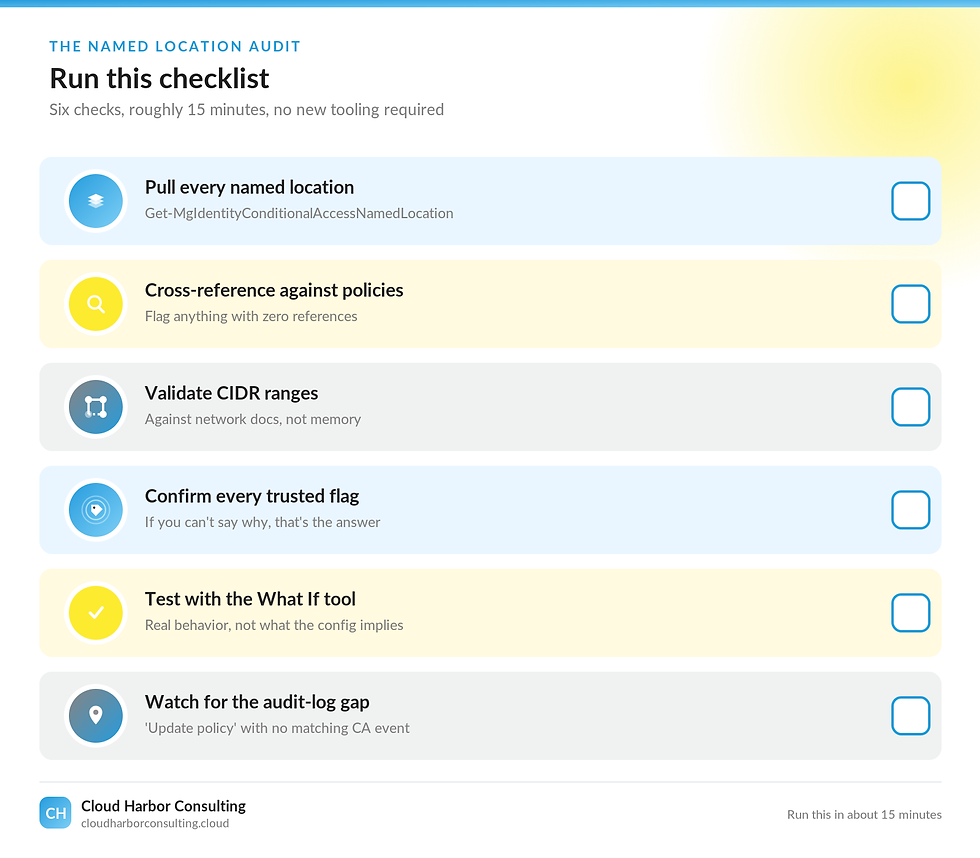
Pull the full list first. Get-MgIdentityConditionalAccessNamedLocation (Microsoft Graph PowerShell) returns every named location in the tenant, including ones no policy currently references.
Cross-reference against active policies. A named location with zero policy references is either safe to remove or evidence that a policy got restructured without anyone cleaning up after it. Either way, it needs a decision, not silence.
Validate CIDR ranges against current network documentation, not memory. This is the exact check that would have caught the client's issue: pull the actual list of IP ranges, confirm each one is still owned and still routes where the name says it does, and remove or update anything that doesn't.
Review which locations carry the trusted flag and confirm each one is intentional. If you can't say why a location is trusted, that's the answer.
Use the What If tool and sign-in logs to test real behavior against real policy, not just what the configuration implies on paper. The Conditional Access tab in a sign-in log entry shows exactly which policies matched and why.
Get in the habit of cross-checking the audit trail rather than trusting a single log source. The historical AADGraph gap described above is closed, but the principle holds: an "Update policy" event with no corresponding "Update conditional access policy" event within a couple of seconds is worth investigating whenever you see it. A KQL query against AuditLogs can flag the pattern automatically.
Put this on a calendar. A named-location audit is a recurring check, not a one-time cleanup project, because the thing that makes named locations fail is exactly the thing that makes them convenient: nobody has to touch them for the policy to keep running.


The takeaway
A named location is infrastructure. It decays without maintenance, and Conditional Access has no way to flag when that's happened, it just keeps enforcing whatever it was told, accurate or not. Fixing it for the client meant opening the named location, reading the list end to end, and checking each entry against reality. That's the whole audit. It just has to actually happen.
Are Your Conditional Access Named Locations Validated, or Just Configured?
Cloud Harbor Consulting partners with security architects and engineering teams to turn a Conditional Access deployment that looks correct on paper into one that has been checked against the network it is actually supposed to protect, CIDR ranges, trusted flags, and policy references confirmed in the right order. Schedule a conversation to walk your tenant's named locations against this audit checklist and pinpoint where a stale IP range, an unreviewed trusted flag, or an orphaned location referencing nothing is leaving sign-ins exposed that your compliance report says are covered.


Comments