Entra ID External Identities: Governance Decisions for B2B Collaboration

I worked with a client that had more than 50,000 guest users in its Microsoft 365 tenant and no process for reviewing any of them. Nobody could say which guests still needed access.
A tenant gets there by default. Anyone in the organization, including guests, can invite guests (the Microsoft Graph authorization policy sets allowInvitesFrom to everyone). B2B collaboration is enabled in both directions with every external Microsoft Entra organization. MFA claims from those organizations aren't trusted. Each default is a governance decision that nobody made.
B2B collaboration is part of Microsoft Entra External ID, formerly called External Identities. Scope: B2B collaboration in a workforce tenant.
The exposure is third-party access. Verizon's 2026 Data Breach Investigations Report found third parties involved in 48% of breaches, up from 30% the year before. The report describes 3 patterns of third-party involvement, and as far as I can tell it doesn't break out B2B guest accounts as their own category. A guest account is one way a third party connects to your tenant. A stale one is a connection nobody reviews.
My client ended at about 11,000 guests. Five decisions keep a tenant from reaching 50,000. The cleanup now has a price under today's licensing, which changed after the engagement.
The 5 decisions
Decisions 1 to 4 control how guests accumulate. Decision 5 removes the ones that accumulated anyway.

1. Who can invite, and which organizations
External collaboration settings control who can send invitations and which domains are allowed or denied. There are 4 invite options, from anyone in the organization (the default) to no one, admins included. Under the default, every employee and every guest is an inviter nobody reviews.
Cross-tenant access settings control which external Entra organizations you collaborate with. The default settings cover every organization you haven't configured. Organizational settings override the defaults for a specific partner.
Audit before you tighten. Microsoft warns that blocking the defaults can break existing collaborations, and it recommends using sign-in logs to see current cross-tenant activity first. Let the logs show which partners a change would cut off.

2. What guests can see
Guest access has 3 levels. Guests can have the same access as members, limited access to properties and memberships of directory objects, or access restricted to their own directory objects. Limited access is the default. At that level, guests can't enumerate users, groups, or other directory resources, and they can see the membership of non-hidden groups.
Check which level your tenant uses. The most inclusive level gives guests the same directory access as your employees.
3. What you trust from their tenant
By default, your tenant doesn't trust MFA or device claims from other Entra organizations. A guest who completed MFA in their home tenant completes it again in yours.
Inbound trust settings let you accept 3 claims from a specific partner: MFA, compliant device, and hybrid joined device. Your Conditional Access policies still apply to the guest. A guest who already satisfied MFA at home skips the second prompt. Configuring trust settings requires Microsoft Entra ID P1 in the tenant you're configuring.
Microsoft's baseline MFA policy guidance says you can exclude guests from the all-users policy when you target them with a guest-specific policy. Build that policy on purpose, then decide partner by partner whether to trust their MFA claim.
4. How access is granted
Entitlement management adds access packages, connected organizations, approvals, and expiration dates to guest access. When an external user loses their last access package assignment, the default is to block sign-in for 30 days and then remove the account. It applies that only to guests it invited or guests converted to governed, so directly invited guests stay until someone removes them.
Sponsors give each guest an accountable person. A guest can have up to 5 sponsors, and the inviter becomes a sponsor by default. Sponsors can approve access package requests. Guests shared through SharePoint get no automatic sponsor, so assign those manually.
5. How access ends
This is the decision my client hadn't made. The design we used:
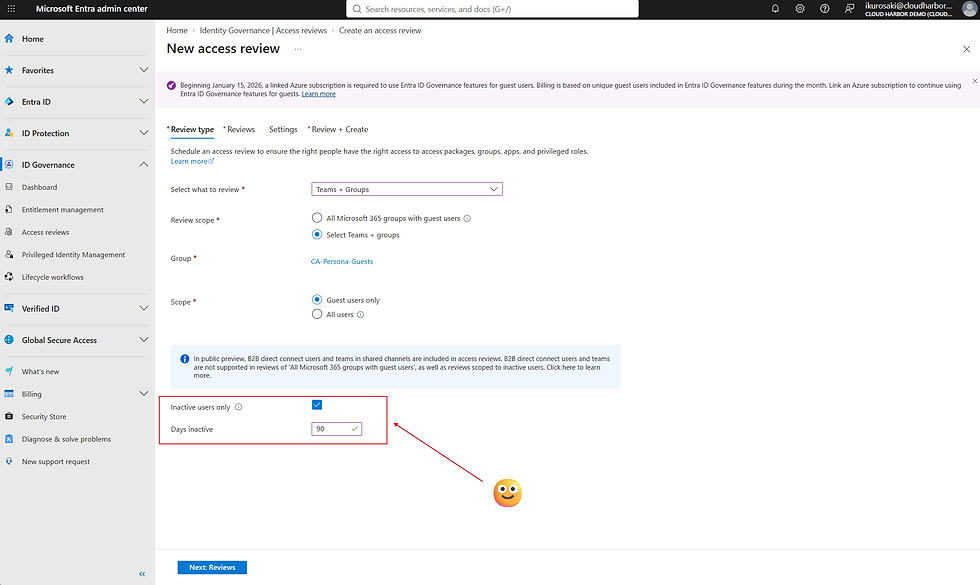
A dynamic membership group with the rule user.userType -eq "Guest". Microsoft's review scope "All Microsoft 365 groups with guest users" excludes dynamic groups, so you select this group as the review target directly. Dynamic membership groups require Microsoft Entra ID P1 for each unique member, and Learn doesn't say how that applies to guests. Confirm your licensing before you build the group.
A quarterly access review of that group, scoped to inactive users at the tenant level, with an inactivity threshold of 90 days. Microsoft lets you set the threshold up to 730 days.
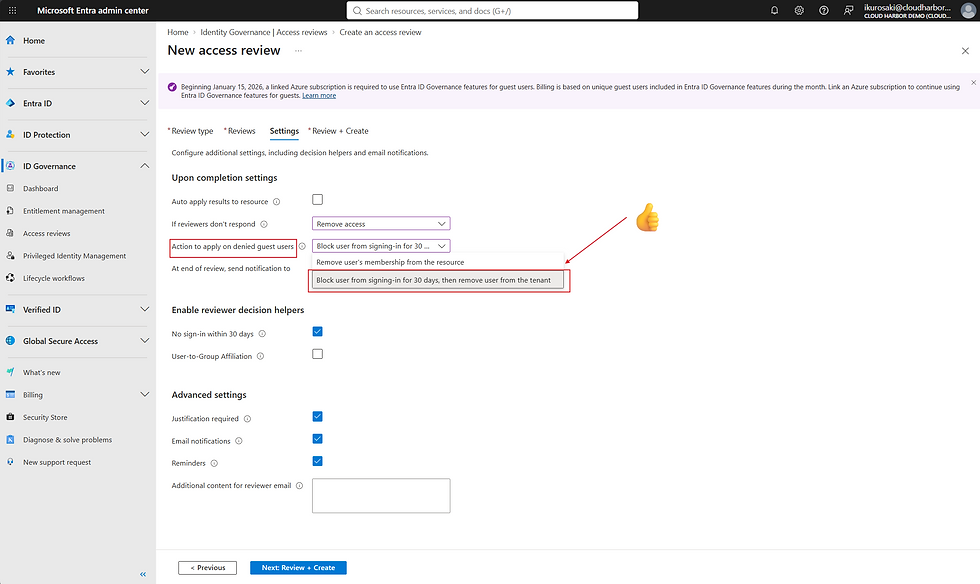
Reviewers set to an empty Entra ID security group, with a 1-day duration. Set "If reviewers don't respond" to Remove access; No change would leave every guest in place. With no reviewer responding, the removal applies the next day.
Auto-apply on, with the action set to block the user from signing in for 30 days, then remove the user from the tenant.

Microsoft documents this pattern as automatic removal of inactive guests.
Two recovery windows exist. During the 30-day block, an admin can re-enable the guest. After deletion, Microsoft says you can restore the guest for up to 30 days. After that, the guest needs a new invitation.
The client wanted to move fast and skipped a pilot. Roughly 2 to 5% of the removed guests came back through re-invitation, and the reduction from more than 50,000 to about 11,000 took 3 to 6 months. A pilot on a scoped group would have shown that rate before production.
Microsoft leaves recently created guests out of the review until they pass the inactivity window, so a guest invited again after deletion sits out the next 90 days.
Identity Governance Architecture: Building Lifecycle Workflows in Entra ID covers the same problem for employees.
What the cleanup costs now
My client ran this review under Microsoft Entra ID P2 licensing. Microsoft has since classified inactive-user access reviews as an Entra ID Governance feature. Inactive-user reviews bill to the guest governance add-on, and Microsoft's licensing page says the add-on is enforced beginning in January 2026.
The rules, from Microsoft's licensing page and Azure pricing page:
The add-on costs $0.75 per monthly active guest. It has no free tier. The first 50,000 free monthly active users apply to External ID core features only.
The meter counts guests included in the review. In Microsoft's example, a tenant scans 10,000 guests, finds 240 inactive, includes those 240 in the campaign, and pays for 240.
A guest bills once per month, however many governance actions touch them.
The tenant needs a linked Azure subscription and at least 1 Entra ID Governance or Entra Suite license for an administrator. Governance is $7 per user per month, paid yearly. The Suite is $12.
The table below is arithmetic: Microsoft's published price applied to my client's approximate scale. The client ran the review before the billing change, so no invoice exists for this configuration.
Scenario | Guests billed | Cost |
One-time sweep, about 39,000 inactive guests | 39,000 | $29,250 once |
Quarterly review, 5% of 11,000 guests go inactive | 550 | $412.50 per quarter ($1,650 per year) |
Quarterly review, 10% go inactive | 1,100 | $825 per quarter ($3,300 per year) |
Quarterly review, 20% go inactive | 2,200 | $1,650 per quarter ($6,600 per year) |
The 39,000 is the net reduction. If 2 to 5% of removed guests returned, the sweep billed roughly 800 to 2,000 more. The table assumes each guest is included once and bills in one month. Microsoft's page doesn't say whether a guest in the 30-day block bills again in a second month, so check your Azure bill after the first run. The license floor adds $84 per year for 1 Governance license. After the sweep, each quarterly run bills only the guests who went inactive that quarter.
Two alternatives avoid the guest meter, and a hybrid combines them. P2 basic access reviews aren't billed to it, and they need people to decide on each guest. A script that reads sign-in activity through Microsoft Graph can clear the one-time backlog with no meter, and you write, test, and own the code. That property needs Entra ID P1 or P2 and the AuditLog.Read.All permission. The hybrid scripts the backlog and meters the recurring review.
The meter wins when a reviewer's cost per guest decision is above $0.75. At $160.25 an hour (my assumption; replace it with your own loaded rate), $0.75 buys 25 seconds. Across 39,000 guests, 25 seconds each is 275 hours of reviewer time, and any reviewer needing more than 25 seconds per guest costs more than the meter.
A rollout sequence
Link the billing prerequisites. Link an Azure subscription to the tenant and assign 1 Governance or Suite license to an administrator.
Count before you run. Open ID Governance, then Dashboard, then the Guest access governance card, then View inactive guests. The report defaults to 90 days and downloads up to 1 million guests. For guests who never signed in, the count starts at the creation date. Using the report requires Governance or Suite licensing. Multiply the inactive count by $0.75.
Pilot. Run the review on a scoped group with auto-apply off. Agree with the business owner on the re-invite rate that counts as a pass.
Run production. Turn on auto-apply with block-then-delete so both recovery windows exist.
Tell sponsors and partner contacts first. They'll field the partner questions.
Track the bill. Billable guest actions appear in the audit log with TargetUserType: Guest and GovernanceLicenseFeatureUsed: True.
Close the refill. Apply decisions 1 to 4: restrict invitations, set the guest baseline, route new access through entitlement management, and backfill sponsors on the remaining guests. Microsoft's Identity Tools module includes Update-MsIdInvitedUserSponsorsFromInvitedBy for the sponsor backfill.
The business case
For the executive, the cost buys a smaller attack surface. Each inactive guest account could still sign in and kept whatever access it had been granted. None had been reviewed, and none had signed in for 90 days. A compromised guest credential works until someone removes the account.
A one-time cost of about $29,250 removes about 39,000 of them. Set that against the loss. IBM's 2025 Cost of a Data Breach Report put breaches that began with compromised credentials at $4.67 million on average, taking 246 days to identify and contain. Breaches that began with a third-party vendor or supply chain compromise averaged $4.91 million and took 267 days, the longest of any vector. The US average across all causes was $10.22 million. I found no IBM figure for breaches that start with a guest account, so these are the closest benchmarks.
At $4.67 million, the sweep breaks even if it lowers the chance of one such breach by 0.63 percentage points, about 1 in 160. At $4.91 million the figure is 0.60 points (1 in 168), and at $10.22 million it is 0.29 points (1 in 349). These are averages, so substitute your own loss estimate and the break-even moves with it.
How Many of Your Guest Accounts Has Anyone Reviewed?
Cloud Harbor Consulting partners with security architects and technical leadership teams to turn a guest list that grows with every invitation into a governed lifecycle in Microsoft Entra ID, with a sponsor on every guest and a quarterly review that removes inactive guests at a cost you can calculate before it runs. Schedule a conversation to walk your guest inventory and pinpoint where open invitation settings and inactive guests are leaving access open long after the work ended.

Comments