Identity Governance Architecture: Building Lifecycle Workflows in Entra ID

A client asked me a question they couldn't answer with confidence: when someone leaves, is every one of their accounts actually closed?
They had a checklist. They had people who followed it. What they didn't have was assurance. The gaps were the manual steps. An admin disabling the account in Active Directory. Another person removing group memberships in Microsoft Entra ID. Someone else revoking access in the SaaS apps the employee used for their job. Each step depended on a human remembering to do it, finding the right record, and finishing the job. Miss one, and the account stays live.
That gap is where breaches start. Verizon's 2025 Data Breach Investigations Report puts credential abuse as the top initial access vector, at 22% of breaches. Breaches involving a third party doubled year over year, from 15% to 30%, and much of that traced back to poor identity lifecycle management of external accounts. Separate research from Varonis found that 44% of organizations carry more than 1,000 orphaned accounts, and 26% of all accounts sit stale, unused for 90 days or more.
An account no one closed is an account no one is watching. That's the joiner-mover-leaver (JML) problem. You solve it with architecture: defined attributes, automated tasks, and conditions that decide who gets what and when.
What a lifecycle workflow actually is
A lifecycle workflow in Microsoft Entra ID Governance has three parts: tasks, execution conditions, and the lifecycle stage it targets.
Tasks are the actions. Generate a Temporary Access Pass so a new hire can register for MFA on day one. Add or remove group memberships. Enable or disable the account. Revoke a user's refresh tokens. Remove license assignments. Remove access package assignments. Delete the account after a delay.
Execution conditions decide when a workflow runs and who it runs against. The trigger is usually time-based, measured against two attributes: employeeHireDate and employeeLeaveDateTime. The scope filters which users are in play, using attributes like department or job title.
The lifecycle stage is the JML model.:
Joiner: someone enters the organization and needs access.
Mover: someone changes role, and their access has to change with them.
Leaver: someone departs, and their access has to come off.
Here's the dependency that decides whether any of this works. The triggers run off employeeHireDate and employeeLeaveDateTime, so a workflow is only as accurate as the HR data feeding those attributes. If your HR system isn't writing reliable hire and leave dates into Entra ID, your workflows fire at the wrong time or not at all. For the executive, that means the reliability of one HR feed decides whether every downstream identity control actually fires. Fix the data feed before you build the automation. More on that in the deployment sequence below.

Microsoft ships templates for each stage: pre-hire onboarding, joiner onboarding, mover, pre-offboarding, leaver, and real-time leaver for the cases where someone has to be removed immediately. The templates are a starting point. Every organization has its own quirks in how onboarding and offboarding run, so you adjust them rather than deploy them unchanged.
The built-in tasks cover the common actions. For anything past that list, custom task extensions call out to Azure Logic Apps, which lets a workflow do almost anything your environment needs: set an out-of-office reply on a departing user's mailbox, transfer ownership of their Teams and SharePoint content to their manager, or raise a ticket in your service desk for hardware return.

The architecture decisions that matter
Lifecycle workflows are one piece of your identity governance stack. Knowing what each piece owns keeps you from building the same logic twice.
HR-driven provisioning creates and updates the user account from your HR system of record. Dynamic groups handle membership based on attributes that are true right now. Entitlement management packages access for request and approval. Access reviews catch access that's already been granted and ask whether it's still needed.
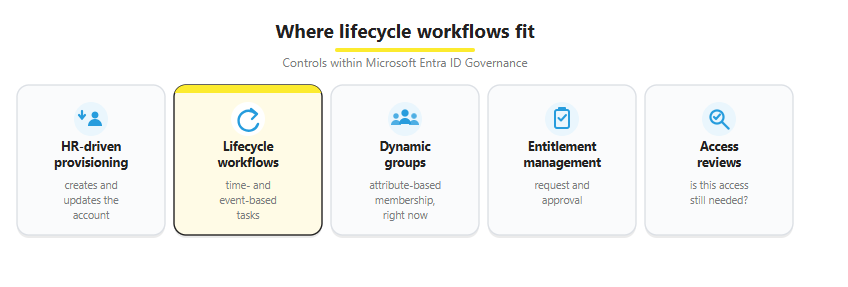
Lifecycle workflows own the time-based and event-based actions the others can't express: do something a set number of days before a hire date, or run a fixed sequence of tasks the moment a leave date passes. They also act on static groups, where there's no dynamic rule to lean on.
Scope is where teams get into trouble. A workflow scoped too broadly runs against users it was never meant to touch. Filter tightly on the attributes that actually define the population: worker type, department, company. Test the scope against a known set of users before you let it run wide.
The mover stage is the one teams skip. When someone changes role, the new access gets added and the old access rarely comes off. Over a few moves, that's how a mid-level employee ends up holding the combined permissions of every job they've ever had.
The leaver stage is where the most expensive mistakes hide. Disabling an account is not the same as deprovisioning it. A disabled account can still hold active sessions, still belong to groups that grant standing access, still carry licenses you're paying for. A complete leaver workflow runs the full sequence: disable the account, revoke its refresh tokens so existing sessions can't be reused, remove group and access-package memberships, then delete on a schedule once any retention window has passed.

The cost of the gap, and the return on closing it
For an executive, the risk translates cleanly. Every account that stays live after its owner leaves is standing access. An attacker who phishes or buys those credentials gets in without tripping anomaly detection, because the account is expected to exist and no one is watching it. The longer the account stays open, the longer someone has to use it. That open time is the attacker's dwell time, and dwell time is what turns one compromised credential into a full incident. Trustle found that 27% of cloud breaches in 2024 involved misuse of dormant credentials.
The cost of closing the gap is easier to defend than most security investments, because the savings show up in labor as well as risk. A Forrester Total Economic Impact study commissioned by Microsoft, modeling a composite organization built from interviewed customers, put numbers on it. Automating ongoing user access management, including deprovisioning, cut the time spent on those tasks by 80%, worth $4.6 million over 3 years. Automated onboarding cut new-hire setup time by 75%, worth $2.7 million. The modeled organization saw a 131% return on investment with payback in under 6 months.
Take those figures for what they are: a Microsoft-commissioned study of a composite organization, not an audited result from one company's books. They indicate the size of the return, and the mechanism behind them holds up. Less manual handling per identity event, multiplied across every joiner, mover, and leaver in a year, is real labor saved and real risk removed.
The named example holds up too. Pearson, the education company, modernized from a legacy identity system to Microsoft Entra ID Governance, integrating their HR platform and automating the joiner-mover-leaver process. They reported reduced administrative burden and fewer support tickets as automated workflows replaced manual steps, along with simpler compliance audits. Tim Brantner, Pearson's Senior Director of Identity and Access Management, put the stakes plainly: "We're transitioning into a digital software company in a very short amount of time, but we can't do that without a strong foundation of identity and access."
None of this is free. Lifecycle workflows require Microsoft Entra ID Governance or Microsoft Entra Suite licensing, with a Microsoft Entra ID P1 or P2 license for each user in scope. And the whole model depends on clean HR data, which is exactly where deployment has to start.
A deployment sequence that works
The order matters. Most lifecycle projects that fail do so because they automate on top of bad data. Here's the sequence I use.
Start with HR. Before you touch Entra, sit down with your HR department and define exactly which fields and values need to exist in your identity provider and directory for lifecycle management to work. At minimum: hire date, leave date, department, job title, and worker type. Agree on where each value comes from, who owns it, and what "correct" looks like.
Integrate your HR solution with Entra ID. Set up HR-driven inbound provisioning so those attributes flow from your HR system (Workday, SAP SuccessFactors, or another source) into Entra ID automatically and stay current. This is what makes employeeHireDate and employeeLeaveDateTime trustworthy enough to trigger on.
Build the leaver workflow first. It carries the highest risk reduction, because the open-account problem is the one most likely to end in a breach. Disable the account, revoke refresh tokens, remove memberships, then delete on a schedule a set number of days after the leave date.
Pilot on a small, scoped group. Run the workflow against a handful of known users and check every task result before you widen the scope.
Layer in pre-hire and joiner workflows. Once leaver is solid, automate the day-one setup: Temporary Access Pass, group memberships, license assignment, the welcome path.
Add custom task extensions for the org-specific steps. Wire up Logic Apps for the actions the built-in tasks don't cover, such as mailbox handling, content handoff, or service-desk tickets.
Monitor with workflow history and audit logs. Watch for failed tasks and alert on them. A workflow that fails silently is the same problem you started with.
Pair workflows with access reviews. Workflows handle the events. Access reviews catch the access that builds up between events, and the accounts a workflow never scoped.
Here's what the end state looks like in practice. One client integrated Workday with Entra ID so that initiating an offboarding in the HR system set off the full downstream sequence automatically. Tasks executed across Active Directory, Entra ID, and several legacy, decoupled business systems, producing a complete offboarding from a single action in the platform HR already used. The departure was recorded once, by the team that owned the event, and access came off everywhere it needed to.
A few failures show up again and again: hire and leave attributes missing or stale, so triggers never fire correctly; scope set too broadly, so workflows touch the wrong users; disable treated as the end of offboarding, leaving sessions and memberships intact; and no monitoring on failed tasks, so a broken workflow looks identical to a working one until an audit finds the gap.
One forward-looking note: Microsoft Security Copilot can now create and manage lifecycle workflows from natural-language instructions, which lowers the barrier to building and adjusting them.
Identity hygiene as an enforced control
A checklist depends on people remembering to run it. A lifecycle workflow runs whether anyone remembers or not, the same way every time, and writes an audit trail while it does. That's the difference between hoping offboarding happened and knowing it did.
Start with the HR data, automate the leaver path first, and prove it on a small scope before you widen it. The access reviews that catch what workflows miss are the natural next build.
Is Your Offboarding Automated or Just Documented?
Cloud Harbor Consulting partners with security architects and technical leadership teams to turn an offboarding runbook that depends on someone remembering each step into automated lifecycle workflows in Microsoft Entra ID that run the same way every time and produce an audit trail. Schedule a conversation to walk your leaver process and pinpoint where manual steps across Active Directory, Entra ID, and the SaaS apps a person used are leaving access open after they're gone.


Well written Derek.