Part 1 of 3: Your Copilot Studio Agent Has An Identity. Here Is How To Govern It

Updated: Jun 18
When a builder publishes an agent in Copilot Studio, an Entra identity is created in the same minute.
Before March 18, 2026, Copilot Studio agents ran under generic app registrations. Audit logs attributed actions to the app, not the agent. Conditional Access couldn't target a specific agent. Forensics on a compromised agent meant correlating across a shared identity.
As of the March 18, 2026 cutover, every Copilot Studio agent in a default-on tenant gets a Microsoft Entra Agent ID: a service principal with the "Agent" subtype. The technical specifics come from a dual-track defensive SecOps PoC I built end to end in May 2026 with two connected Copilot Studio agents, grounded on a curated SharePoint content pack.
The risk frame: AI agents read your SharePoint content, query your Graph, and act under their own identity. The data plane changed. The identity plane has to catch up.
What an Entra Agent ID actually is
An Entra Agent ID is a service principal in your tenant with the "Agent" subtype. The OAuth flow stays the same as for any other service principal. The Entra admin center adds a new Agents blade with different sub-blades.

Where credentials live
A Microsoft-owned blueprint principal acquires tokens for the Agent ID via Federated Identity Credentials. No tenant administrator, including Global Admin, can mint tokens for an Agent ID. Microsoft Learn states the constraint directly: "Can I bring my own Agent ID or app registration? No. To ensure security, compliance, and integration with channels and services, Copilot Studio requires automatic management."

Copilot Studio vs Agent Builder
Customer conversations confuse these two constantly. Copilot Studio agents get Entra Agent IDs. Agent Builder agents do not. Microsoft Learn is direct: "Copilot Studio agents: Receive Entra Agent IDs (or app registrations for legacy agents) for authentication with channels and services. Agent Builder agents: Currently don't use or require app registration IDs or Agent IDs."
For any agent that needs to be governed as an identity, the answer is Copilot Studio. Agent Builder is for ungoverned scratch work.
The Agent 365 control plane
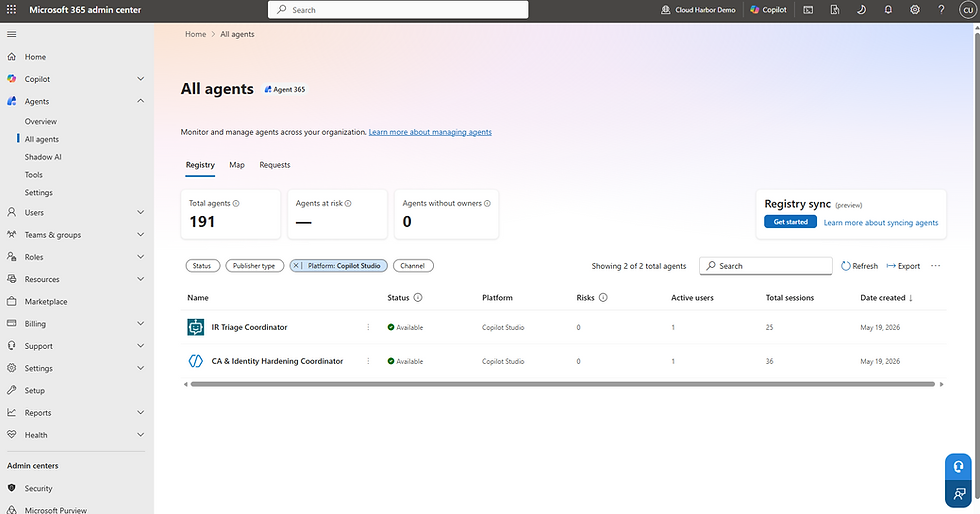
Agent 365 is the governance surface in the Microsoft 365 admin center under Agents. Two blades: Overview, with the analytics dashboard, and All Agents → Registry, with per-agent metadata. The per-agent panel shows publisher, ownership, platform of origin, sensitivity classification, DLP-policy compliance flag, and the Agent ID GUID itself, which is the direct link back to the Entra blade.
Eight roles have read access to the registry: Global Admin, AI Admin, Global Reader, AI Reader, Security Administrator, Security Reader, Reports Reader, and User Experience Success Manager. Only Global Admin and AI Admin can write.

Conditional Access for agents (Preview)
Same policy editor used for users. Under Assignments → Users, agents (Preview) or workload identities, Agents is now a peer option. Target the Copilot Studio blueprint as a parent (covers every Copilot Studio agent in the tenant) or an agent collection as a slice (covers an explicitly chosen subset). The editor filters out controls that don't apply to agents, including MFA on the agent itself, which isn't a coherent control for a non-interactive principal.
This capability is in public Preview as of May 2026. The exact list of supported controls may differ tenant to tenant.
Audit attribution
Microsoft commits in the migration docs that "Audit and sign-in logs attribute agent actions and the resources they access to the specific agent identity, not a generic app registration." Pre-cutover, a SOC analyst investigating an agent action had to correlate across the shared app registration and the user who happened to invoke the agent. Post-cutover, the agent is the actor of record. That is the operational shift.
The connected-agent pattern
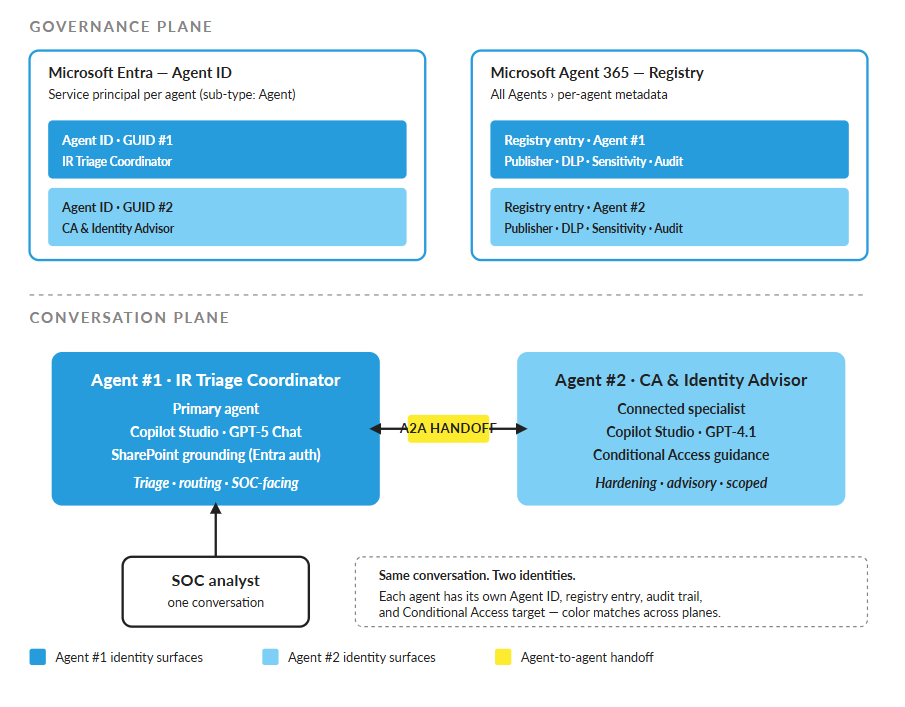
Two agents = two Agent IDs = two registry entries = two audit trails = two CA targeting paths. The PoC architecture I chose was the connected pattern: a primary agent (IR Triage Coordinator) and a connected specialist (CA & Identity Hardening Advisor). One conversation for the SOC analyst, two distinct identities in the governance plane. That separation only exists if you treat each agent as a separate identity from the start.
Why this matters now
AI agent identities are a growing category in M365 tenants. Treating them as anonymous app registrations was tolerable at single-digit agent counts. It breaks operationally at scale, which is the gap Microsoft built Agent 365 to address.
Risk in plain language
Four operational shifts:
Audit attribution makes forensics possible.
Conditional Access targeting controls blast radius.
Sensitivity labels filter data at the chunk level, since Copilot's RBAC is per-chunk rather than per-document.
Registry visibility delivers inventory and lifecycle management.
Dwell time
If an agent is compromised through prompt injection, a supply-chain issue in a connector, or misconfigured grounding, the operative question is how long it can act undetected. Pre-Agent-ID, the answer was as long as it takes a SOC analyst to correlate actions across a shared app registration. Post-Agent-ID, the answer is the audit query interval, because the actions are already attributed to the agent that took them.
What the PoC actually showed
The connected-agent architecture I built (one primary, one specialist) produced two distinct Entra Agent IDs, two registry entries, and two independently targetable Conditional Access scopes for what the SOC analyst experiences as one conversation. That governance property exists only because each agent has its own identity. A one-agent-two-modes design collapses to a single identity and loses it.
The PoC also included a Confidential-labeled runbook file in the SharePoint content pack. A user without access to that file got no content from it, even though the agent had Entra-authenticated SharePoint grounding configured. The agent honored the sensitivity label at the chunk level. The identity boundary gated the data access.
The ROI framing
The identity governance you already paid for, Entra ID P1 or P2, extends to agents at no additional license cost. Agent 365 is $15 per user per month standalone, or bundled in Microsoft 365 E7 / Frontier Suite at $99 per user per month (GA May 1, 2026). The governance plane is the same one your IAM team operates today. There is no new console to staff, no new alert pipeline to triage, no new role model to design from scratch.
The Zero Trust read
An agent is a non-human principal. Verify explicitly maps to audit attribution. Least privilege maps to a scoped Agent ID with its own RBAC. Assume breach maps to CA policy plus a revocation path. Agent ID is the primitive that makes Zero Trust enforceable for AI agents.
How to build it
Seven steps, ordered. Engineers can act. Executives can audit.
Step 1. Verify the PPAC toggle
Power Platform admin center → Copilot → Settings → Entra Agent Identity for Copilot Studio. Default-on tenant-wide since March 18, 2026, but verify per environment. Tenants created before that date may still need the manual flip. If the toggle is off, the agent falls back to a legacy app registration, which is the state you're trying to leave behind.

Step 2. Pick your architecture
One agent gets one identity and one audit trail. Connected primary + specialist gets two identities, granular CA targeting, and a cleaner audit boundary at the cost of one more agent to publish and maintain. For the PoC I went with the connected pattern because the dual-identity story is the demonstration. For a first production build with a narrow scope, one agent is fine.
Step 3. Build in Copilot Studio, not Agent Builder
The Microsoft Learn line settles it: Copilot Studio agents get Entra Agent IDs, Agent Builder agents don't. Teams find out about this six weeks into a build, when someone in IT Security asks for the agent's Entra audit log and discovers there isn't one.
Step 4. Set authentication to "Authenticate with Microsoft (Entra)"
Required for SharePoint grounding to honor per-user RBAC. Default "No Authentication" agents can't return SharePoint content at all, and even if they could, the per-chunk RBAC and sensitivity-label filtering would not apply.
Step 5. Verify the identity exists on both sides
Copilot Studio side: Settings → Advanced → Metadata shows the Entra Agent ID GUID. Copy it. Entra admin center side: Agent ID → All agent identities, search the GUID, confirm the sub-type is Agent and "Uses agent identity" is True.
In the PoC, the matching Entra entry appeared within roughly 10 minutes of first-agent creation in the target environment. If it doesn't appear after 10 minutes, toggle the PPAC setting off, wait 60 seconds, toggle it back on. Microsoft doesn't publish a propagation SLA for the blueprint, so allow time before opening a ticket.


Step 6. Verify Agent 365 registration
M365 admin center → Agents → All Agents → Registry. The agent should appear in the table with publisher, ownership, platform of origin (Copilot Studio), and status fields populated. Expand the row. The per-agent panel shows the Entra Agent ID GUID, the instructions excerpt, identity, environment, and platform fields. The GUID in this panel should match the one from Step 5.

Step 7. Apply Conditional Access scoping
Entra admin center → Protection → Conditional Access → New policy → Assignments → Users, agents (Preview) or workload identities → Agents (Preview). Target the Copilot Studio blueprint to govern the fleet, or an agent collection to govern a slice. Start in Report-only mode. Pair with the sign-in risk and device compliance baselines you already run for users.

Pattern guidance
For the first production build, default to defensive-only, read-only grounding. Earn write access to production data with audit history from the read-only phase.
Validation checklist
PPAC toggle on for target environment
Entra Agent ID GUID visible in Copilot Studio → Settings → Advanced → Metadata
Matching entry in Entra → Agent ID → All agent identities, sub-type: Agent
Matching entry in M365 admin center → Agents → Registry
Audit log shows agent-attributed actions, not app-registration-attributed
Optional: CA policy saved in Report-only mode, targeting the Copilot Studio blueprint
Where this leaves you
The identity plane for AI agents is live. Copilot Studio agents are first-class identities in Entra, governed in the same M365 admin center and Entra blades your IAM team already operates. The capability shipped March 18, 2026. The architectural decision is still in front of every security team: treat agents as governed identities from day one, or absorb the operational debt of retrofitting governance after the agent count crosses 50.
I built the PoC to prove out the dual-identity governance story end to end. The technical specifics work. The operational story holds up. The remaining question is whether your tenant treats this as an inventory problem or as an identity-plane problem.
Coming soon, a future piece of this series covers the pro-code expansion path on Microsoft Agent Framework and the Agent 365 SDK, including A2A handoff between low-code and pro-code agents.
Comments