Part 2 of 3: Your Pro-Code Agent Has an Identity Too. Here Is How Conditional Access Governs It

The CA Drift Sentinel's job is to read the tenant's Conditional Access policies, diff them against a published baseline, and report drift. In this PoC, Conditional Access blocked it.
The block appeared in 2 places: the agent sign-in log and the Container Apps console log, joined by a correlation ID. The Sentinel had its own Entra agent identity. The policy evaluated that identity, found the condition unmet, and denied the token. The control the agent was built to audit treated it as a principal to govern.

Part 1 of this series covered 2 Copilot Studio agents, each with its own Entra agent identity and Agent 365 registry entry, governed through the same Entra admin center and Microsoft 365 admin center the IAM team already operates. Part 2 takes the same model to a custom-built, headless agent and adds live enforcement.
The agents touching a tenant's security posture are increasingly custom code running on a schedule. The identity plane has to hold there too.
The CA Drift Sentinel
The Sentinel is a headless, scheduled agent with no signed-in user. It runs as an Azure Container Apps job, calls Microsoft Graph to read Conditional Access policies, diffs them against a committed baseline, and emits a drift report for writeback to the designated SharePoint site. No human in the loop. No browser session to interrupt.

The Sentinel runs under app-only access. In a standard client-credentials flow, the blueprint principal authenticates and the token subject is the blueprint, not the agent. Conditional Access policies targeting agent identities evaluate the token subject; if the subject is the blueprint, the agent identity is not in scope.
The Entra Auth SDK sidecar resolves this. It runs as a second container alongside the agent, handles the 2-leg token exchange with Entra, and makes the agent identity the token subject in the issued access token. That is what puts the Sentinel in scope for CA policies targeting agent identities.
Secrets never enter the agent code. The sidecar manages the certificate and token lifecycle on the agent's behalf.
Practitioner callout: build order matters! You can hand-assemble an Entra agent identity: create the blueprint, register the identity, assign permissions, wire a federated credential. That agent will authenticate and obey Conditional Access. It won't appear in the Agent 365 registry. Agent 365 expects its own tooling to own blueprint creation. The Agent 365 CLI stamps platform metadata that a hand-built blueprint doesn't carry. In our build, that included the managerApplications linkage the registry keys on. Without it, the registry has no record of the agent. We built the Sentinel Entra-first. The cost was a rebuild through the Agent 365 CLI to get registry visibility. The clean pattern: scaffold with the Agent 365 CLI first, then layer code, permissions, and Conditional Access on top.Two enforcement signals, proven live
The same identity primitive and CA surface from Part 1 hold for a pro-code agent. The enforcement plane does not change when the build path does.
These agent identity and Conditional Access for agents capabilities are in public preview as of June 2026; verify them in your own tenant before relying on them.
The Sentinel's governance in this PoC used 2 distinct policy shapes. Both are documented enforcement patterns for autonomous agents. Both were proven on the running agent by forcing the condition and capturing the block.
CA-COV012: Allow only approved agent identities
CA-COV012 targets agent identities by a custom security attribute. The attribute set is AgentIdAttributes; the attribute is AgentIdApprovedForUse, a single-valued string with an approved value of yes. Agents without the approved value are blocked at token issuance via a Block grant.
This is an attribute-driven scoping pattern: the policy identifies which agent identities may request tokens for governed resources. Any identity without the approved tag is denied. The practical advantage is scale: adding a new agent to the approved set is an attribute assignment, not a policy edit. The policy stays stable as the agent count grows.

To prove the block, we removed the approved attribute from the Sentinel's agent identity and ran the job. The Container Apps log showed a failed Graph call. The service principal sign-in log showed the denial reason. The same correlation ID appeared in both.
CA-COV011: Block agent identities with Medium or High risk
ID Protection for Agents assigns a risk level to an agent identity based on detections, including admin-confirmed compromise. CA-COV011 keys on that risk level.
Risk is a dynamic condition: the same agent identity can clear every token acquisition today and be flagged tomorrow after an anomalous event. CA-COV011 blocks the agent on the first token acquisition after the risk level crosses the threshold. No manual intervention required.
To prove the block, we used the confirm-compromise action on the Sentinel in the Risky Agents report. Confirm-compromise sets the agent's risk to High and creates a risk detection event. On the next token acquisition, CA-COV011 evaluated the signal, found High, and blocked the request.

The proof
With the approved attribute present and no active risk, the Sentinel runs clean: it acquires its token, reads the policies, and produces the drift report. The two blocks here are the deny side of the same identity evaluation.
Both blocks appear in the service principal sign-in logs. The Agent type field reads Agent Identity; the Agent subject type field reads Not Agentic. The Container Apps console log shows the same run as a failed Graph call. One correlation ID ties the two records together.
Blocked due to missing custom security attribute:


Blocked due to "agent compromise" and at High risk:

Log details from the Azure Resource Manager display an error in the Sentinel container, indicating "BLOCKED BY CONDITIONAL ACCESS" due to token acquisition being denied, with error code AADSTS53003 and a specific correlation ID. 
The image displays a sign-in activity log from the CA Drift Sentinel Identity management interface. It highlights a failed sign-in attempt on June 17, 2026, due to a conditional access policy blocking token issuance. The error code is 53003, and the failure reason is prominently noted. 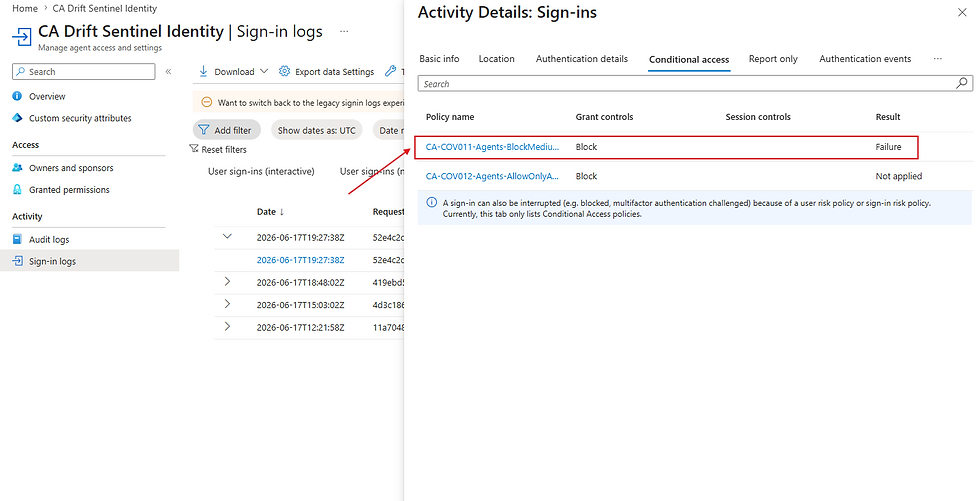
Sign-in attempt failed due to a conditional access policy block in CA Drift Sentinel Identity, highlighting potential security measures in place.
Conditional Access blocked the agent built to audit Conditional Access. The block is documented, attributed to the agent identity, and traceable end to end.
Why this matters
A pro-code agent with Graph read access to a tenant's security configuration is a reconnaissance asset if compromised. It can read CA policies, inspect named locations, enumerate enforcement targets, and map the policy posture before any analyst notices.
Risk-based CA changes the response timeline. ID Protection flags the agent at detection. CA-COV011 acts on that flag at the next token acquisition. No analyst opens a ticket or initiates a block. The enforcement follows the signal.
The gap, without either policy, is detection without enforcement. ID Protection can surface a risky agent in the Risky Agents report. Without a CA policy consuming that signal, the agent continues to acquire tokens until someone manually disables it. In a tenant with a growing agent count, that manual step is the one that gets deferred.
How to build and prove it
7 steps, ordered. Engineers can act. Executives can audit.
Step 1. Scaffold the blueprint with the Agent 365 CLI first. The CLI stamps the platform metadata the Agent 365 registry requires (in our tenant, the managerApplications linkage); going Entra-first forces a rebuild to get registry visibility. See the build-order callout above.
Step 2. Layer your code, add the Auth SDK sidecar as a second container, and confirm the sub claim in the issued token matches the agent identity's object ID, not the blueprint principal's.
Step 3. Confirm the agent appears in the Agent 365 registry (Microsoft 365 admin center, Agents, All Agents, Registry) with the Entra Agent ID GUID and platform of origin populated.
Step 4. Create an AgentIdAttributes attribute set with an AgentIdApprovedForUse attribute (String, single-valued) and assign the approved value yes to the Sentinel's agent identity.
Step 5. Author CA-COV012 targeting agent identities by the AgentIdApprovedForUse attribute, Block grant, in Report-only mode first.
Step 6. Enable ID Protection for Agents and author CA-COV011 with the agent risk condition set to High, grant to Block.
Step 7. Prove both blocks. Remove the approved attribute to trip CA-COV012. Use confirm-compromise in the Risky Agents report to trip CA-COV011. Capture the Container Apps log and service principal sign-in log for each block. Join them on the correlation ID.
Validation checklist
Blueprint scaffolded via Agent 365 CLI; agent visible in the registry
Token sub claim = agent identity object ID (not the blueprint principal's)
Agent 365 registry entry: Entra Agent ID GUID and platform of origin populated
CA-COV012 in enforcement mode; approved AgentIdApprovedForUse attribute (value yes) assigned to the Sentinel
CA-COV011 in enforcement mode; ID Protection for Agents active
Both blocks documented: service principal sign-in log and Container Apps log joined by correlation ID
Pattern guidance: Start with defensive-only, read-only Graph scope. The SharePoint write-back path is a separate investigation and is not covered here.
Where this leaves you
The identity plane holds from low-code to pro-code. The same Conditional Access policies that govern a Copilot Studio agent govern an Azure Container Apps job built from scratch. The same Agent 365 registry holds both.
Build order is the one lesson worth taking into the next build: scaffold through the Agent 365 CLI, then add code and policies. Going Entra-first costs a rebuild to get registry visibility.
For most tenants, the live question is whether the custom automation already running has its own agent identity and a CA policy that can block it on risk. Custom automation without governed identity sits outside the enforcement plane. The tooling to bring it in is the same tooling from Part 1.
Part 3 closes the series. Identity and Conditional Access decide whether an agent gets a token. They say nothing about the data it reads once it has one, or the signal you get when an agent identity is the thing under attack. That is where Purview and Defender come in: Purview for the sensitivity and movement of the data an agent touches, Defender for detection and response when an agent is compromised. Same two agents, low-code and pro-code; one more plane of control.

Comments