PIM vs Service Accounts: When Privileged Identity Management is the Right Answer

On May 18, 2026, Microsoft's Security blog published details on Storm-2949, an attack that moved from a single compromised identity to cloud-wide breach without dropping malware. The path used self-service password reset abuse and standing administrative access already sitting on the account. The attack required no exploit. The privilege was already there.
That story sounds extreme until you see what's running inside most tenants. On a recent client engagement, an employee credential got phished. The attacker pivoted to a service account that account had access to. That service account held standing administrative privilege in the ERP system, several customer-facing sites, and the integration platform tying them together. The privilege had been in place for years. Nobody knew when it had been granted or why it had not been reviewed.
This article is the framework I use to sort out the question that gets asked on every privileged access project: should this be a PIM-eligible role, or should this be a service account? The two solve different problems. Picking the wrong one is how tenants end up looking like Storm-2949's next victim.
PIM and service accounts: what each one does
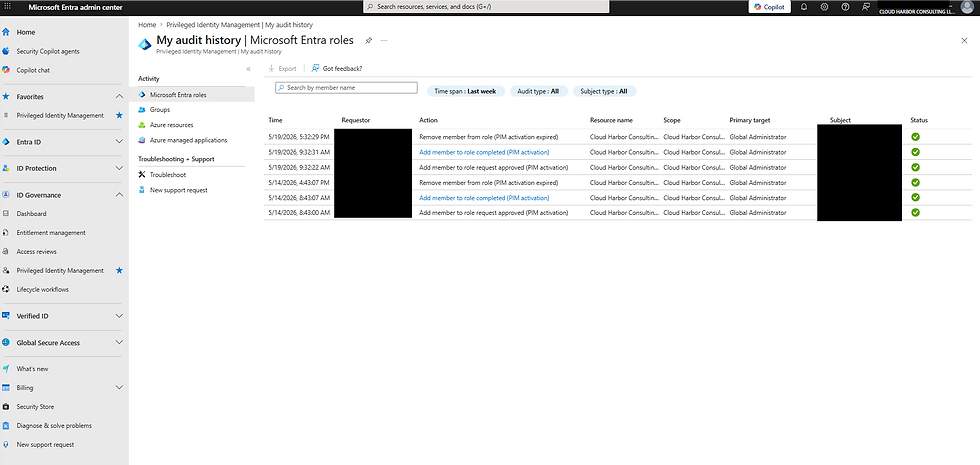
Privileged Identity Management is a feature of Microsoft Entra ID P2 and Entra ID Governance. It controls when a human gets privilege. A user is assigned an eligible role. The user activates the role when they need it. Activation can require MFA, a justification, an approval step, and a time bound between 30 minutes and 24 hours. When the window closes, the privilege is gone until the next activation.
A service account is the identity a workload uses to authenticate. In Microsoft Entra ID, that label covers three different objects. Managed identities are Azure-managed credentials assigned to a resource (system-assigned to a VM or function, or user-assigned and shared across resources). Service principals are the identities behind app registrations, authenticated with a certificate, client secret, or federated credential. Legacy user accounts repurposed for automation are the third category and the most common source of incidents. They look like human users, but they are running scripts, scheduled tasks, or unattended integrations.
PIM controls when a human gets privilege. Service accounts control what identity a workload uses. The job is to match each access pattern in your tenant to the right control.
How to pick the right control
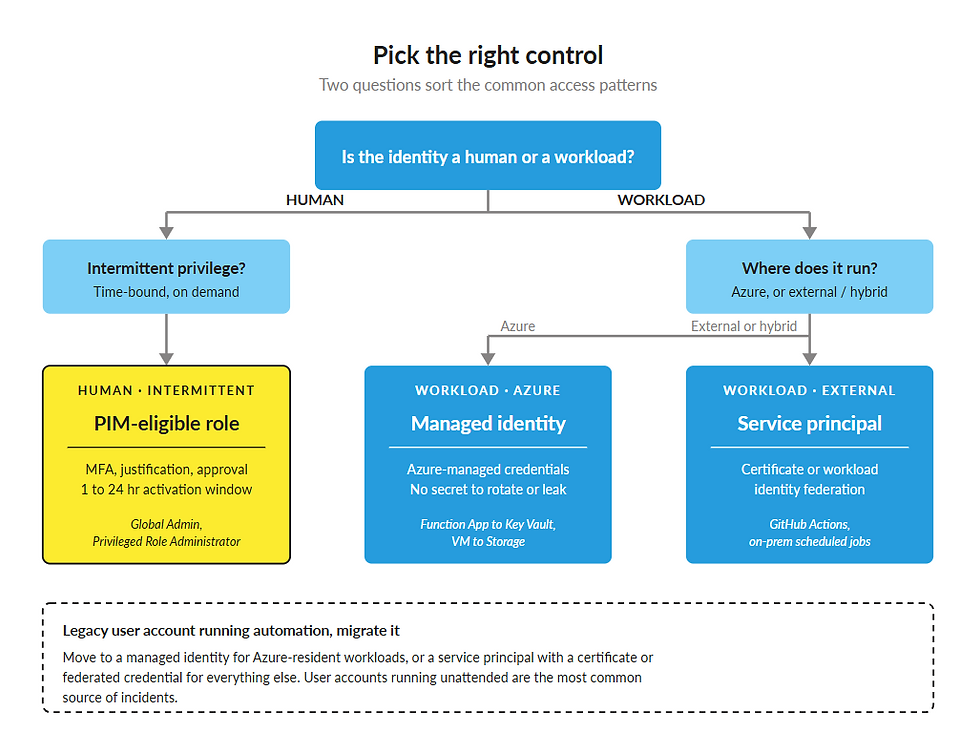
Two diagnostic questions sort 95% of cases.
Question 1: Is the access pattern a human or a workload?
A human signs in interactively. A workload runs on a schedule or in response to an event. If a person needs to read the audit log once a week, that is human access. If a runbook needs to read the audit log every 5 minutes, that is workload access.
Question 2: Is the access continuous or intermittent?
Continuous access means the identity needs the privilege whenever the workload runs. Intermittent access means the identity needs the privilege on demand and can wait for activation.
Four patterns cover the common cases:
Access pattern | Right control | Why |
Human admin, intermittent privilege | PIM-eligible role | Privilege exists only during activation. Audit log captures who, when, and why. |
Azure workload, continuous privilege | Managed identity | No credentials to rotate. Azure handles the secret lifecycle. |
External or hybrid workload, continuous privilege | Service principal with certificate or federated credential | Certificate or workload identity federation removes the password from the equation. |
Legacy user account running automation | Migrate to managed identity or service principal | User accounts running unattended are the worst available option. |
A note on what PIM does for workload identities. Microsoft Learn documents that service principals cannot be assigned as eligible (the activation flow is built around interactive sign-in). They can be granted time-limited active assignments through Entra ID Governance. That gives you a bounded window for workload privilege without the full PIM activation experience. Use it when a workload truly needs administrative access for a defined task.

A note on what "service account" means in Entra ID. The term is used loosely. In most tenant conversations it refers to a user account someone created years ago, named svc-something, and gave permanent admin rights to so a script would keep running. That is the worst version of a service account and the one that shows up in incident reports. The right options are managed identities for Azure-resident workloads and service principals (with certificates or federated credentials) for everything else.
If the pattern is human and intermittent, the answer is PIM. If the pattern is workload and continuous, the answer is some form of service account, and the specific form depends on where the workload runs.
The business case
Standing privilege is a multiplier on every credential compromise. The Storm-2949 write-up reinforces this. The attacker did not need a zero-day. The attacker needed an account with privilege already attached.
PIM compresses the window. A role that is eligible for 8 hours per quarter is at risk for 8 hours per quarter, not 24/7. For most administrative tasks, the actual time-on-keyboard is closer to 30 minutes. Reducing the exposed window from 90 days of standing privilege to a few hours of active privilege changes what a compromised credential can do.

Legacy service accounts running with permanent admin rights are the worst version of standing privilege. The password rarely rotates. The audit log shows the account doing things, but no human is associated with the action. When something goes wrong, the investigation has to reconstruct intent from logs alone.
The audit trail matters for recovery speed. PIM activations are logged with the user, the role, the justification, and the duration. When a tenant is responding to an incident, knowing which administrative actions were authorized and which were not is the difference between a 2-day investigation and a 2-week investigation.

The licensing reality. PIM requires Entra ID P2, which is included in Microsoft 365 E5 and available as Entra ID Governance. If you already have E5, you have PIM. If you do not, the line-item cost is real, and it should be compared with the cost of standing privilege you are choosing not to remove.

The checklist
Five steps to convert a tenant from standing privilege to a controlled model.
Step 1: Inventory.
Pull a list of every account with administrative privilege in Entra ID. Tag each one as human, managed identity, service principal, or legacy user account running automation. Most tenants have not done this in years and find accounts nobody recognizes.
Step 2: Convert humans to PIM-eligible.
For every human admin account, remove the standing role assignment and replace it with an eligible assignment. Configure activation policy: MFA required, justification required, approval required for the highest-impact roles (Global Administrator, Privileged Role Administrator, Privileged Authentication Administrator), and a default activation duration that matches actual usage (often 2 to 4 hours).
Step 3: Convert workloads to managed identities.
For every Azure-resident workload using a service principal with a client secret, evaluate whether a managed identity will work. System-assigned for single-resource cases. User-assigned where multiple resources share credentials. The win is that there is no secret to rotate, no secret to leak.
Step 4: Kill or constrain legacy service accounts.
This is where most tenants find the real damage. The hook story is the common case. The cleanup work is rarely the technical part. It's the dependency mapping, the password rotation across every integration that depended on the account, and onboarding the human operators into PIM for the administrative tasks they needed.
A legacy account holds credentials many other integrations depend on. Removing it requires mapping those dependencies before you can shut it down.
Step 5: Access reviews.
Configure access reviews on the eligible assignments. Quarterly for high-impact roles, semi-annually for lower-impact. The reviewer is typically the account owner's manager or a designated security reviewer. Reviews that nobody acts on are worse than no reviews, so the approval flow has to land with someone who will make a decision.
The order matters. Inventory first because the rest of the checklist depends on knowing what exists. Humans before workloads because human accounts are usually easier to convert and the win is visible quickly. Legacy service accounts last because the dependency mapping is the slowest part.
Putting it together
PIM controls when a human gets privilege. Service accounts control what identity a workload uses. Tenants that do both well are the ones that have stopped treating "service account" as a free pass to give standing admin to a user object.
The licensing comparison is simple. PIM is included in Entra ID P2 and Entra ID Governance. Managed identities are free with Azure. Service principals are free with Entra ID. The cost of the controls is small relative to the cost of one Storm-2949-style incident.
If you have not done the inventory step, start there. The rest follows.
Is Every Privileged Identity in Your Tenant Mapped to the Right Control?
Cloud Harbor Consulting partners with security architects and technical leadership teams to convert PIM, managed identities, and service principals into one defensible model across Microsoft Entra ID. Schedule a conversation to walk the decision framework and pinpoint where standing privilege, unattended user accounts, or over-permissioned service principals are leaving exposure on the table.


Comments