The Security Bridge™️- Identity Threat Protection in Microsoft 365 - Part 1: Identity Threat Protection Starts After the Login

Updated: Jul 22
Most Microsoft 365 environments still treat the sign-in event as the finish line for identity security. In the division-of-labor attacks that made up 9% of Mandiant's 2025 investigations, the median hand-off from initial access to a second operator fell to 22 seconds, down from more than 8 hours in 2022. The sign-in event starts the risk clock.
Verizon's 2025 Data Breach Investigations Report found that among threat actors targeting Microsoft 365 accounts with MFA bypass techniques, 31% used token theft, ahead of MFA fatigue at 22% and adversary-in-the-middle attacks at 9%. Multi-factor authentication remains worth enforcing. These numbers describe what happens to the accounts that already have it.
Authentication proves identity. It does not prove trust.
What "after the login" actually contains
A successful sign-in tells you who authenticated. It does not tell you what that identity can now reach, and in most Microsoft 365 tenants, nobody has fully mapped the answer.
Excessive privilege. Privileged Identity Management (PIM) usually protects the roles everyone already worries about, Global Administrator chief among them, while other highly privileged roles stay permanently assigned. Compass Security's 2026 Entra ID assessment series describes this as a recurring pattern across real-world tenants: PIM gets configured for the well-known roles and quietly skipped for the rest.

Unmanaged devices and token handling. A stolen session token skips MFA entirely, because the token already proves the authentication happened. Adversary-in-the-middle proxies exist specifically to harvest that token at the moment of sign-in. Conditional Access token protection counters this by binding a token to the device that requested it, so a copied token fails on any other machine.

Application and workload access. OAuth consent and service principal ownership create a path that never touches a human sign-in at all. An over-permissioned app registration, or a service principal owned by an account nobody reviews, gives an attacker a way in that most identity monitoring never looks at. Compass Security's assessment series on foreign enterprise applications documents a sharper version of the same problem: when an app's credentials live in a tenant you don't control, the permissions you granted outlive your ability to review who's actually using them.

These three gaps chain together into what's usually called an identity attack path: group membership grants eligibility for a role, that role's activation requirements are weaker than they look, and the account holding it was never reviewed. An attacker can reach your most privileged account without ever touching it directly, through any account that eventually connects to it.

What this looks like in production
I worked with a client whose environment was managed in part by an MSP with rotating engineering staff. There was no identity lifecycle process tied to that rotation. An access review surfaced PIM-eligible roles still assigned to administrator accounts belonging to MSP staff who had rotated off the engagement months earlier; no one had removed the eligibility when the engagement changed hands. We implemented recurring access reviews with multi-stage approval, so an eligible assignment can't persist past a set window without someone actively signing off on it.
A similar gap showed up in application access. A client's app registration held Directory.ReadWrite.All among a broad set of Graph permissions, granted to support a third-party vendor integration. The vendor couldn't produce documentation justifying the scope, and no one had required approval before the consent was granted. We built a consent approval process that requires vendor documentation justifying each requested permission before consent is granted, not after.
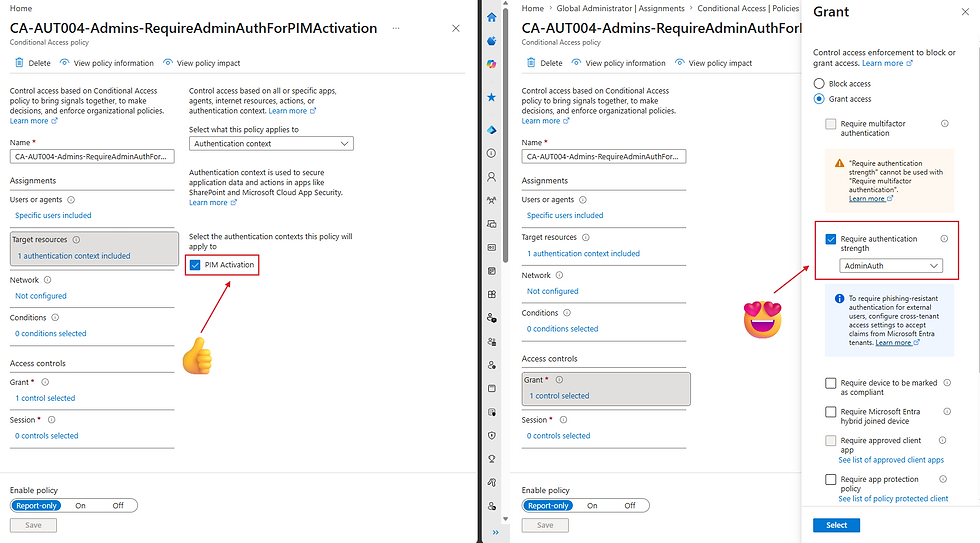
In a recent client engagement, I saw the Conditional Access gap manifest directly: the PIM activation policy required only the built-in Azure MFA claim, so administrators authenticated with whatever MFA method they had registered, phishing-resistant or not. A stolen token that already carried an MFA claim could complete the PIM activation on its own. We migrated administrators to phishing-resistant MFA, built an authentication context specifically for PIM activation, assigned it to the relevant roles, and configured a Conditional Access policy that enforces phishing-resistant MFA whenever that authentication context is invoked.
Business case
Mandiant's 2026 report puts the global median dwell time at 14 days, up from 11 days in 2024. Multiply that window by the number of systems reachable from a single compromised identity's attack path, and you get the real scope of remediation: every system that identity could touch during those 14 days. Standing privilege multiplies that blast radius even when detection is fast, because the attacker isn't waiting on a slow escalation process. They're already positioned.

What to validate this week
Inventory which roles are PIM-eligible versus permanently assigned, and who approved that assignment
Require phishing-resistant authentication and "sign-in frequency: every time" for sensitive authentication contexts, including PIM activation and admin portal access
Turn on token protection Conditional Access policies for Exchange and SharePoint scopes where supported
Review high-privilege app consents and service principal ownership quarterly, not annually
Use Continuous Access Evaluation as a backstop for the gap between compromise and detection, on top of the controls above
The takeaway
Authentication proves identity. It does not prove trust. Everything past the sign-in screen, privilege, device posture, application access, is where that trust actually gets tested. Part 2 turns to the identities most organizations never audit at all: the service principals, workload identities, and agents that now outnumber the humans in most Microsoft 365 tenants.


Comments