How to Design a Microsoft Zero Trust Architecture: Decision Points and Trade-Offs

Zero Trust builds usually fail 8 months in, when someone asks for one exception to a Conditional Access policy (the rule engine in Microsoft Entra ID that decides who gets access, from where, and under what conditions) and nobody on the team can say what else that exception will break.
That's the failure mode of treating Zero Trust's six pillars, identity, endpoints, apps, data, infrastructure, and networks, as a checklist to complete in parallel. Each pillar decision made on its own. Each one defensible by itself. The result is a pile of individually reasonable choices with no order connecting them.
A Zero Trust architecture is a sequence of trade-off decisions. The order you make them in determines whether the result is something your team can keep changing safely, or something nobody wants to touch.

The five decisions that define the architecture
Every Microsoft 365 Zero Trust build runs through the same five decision points. Each one has two real options, and each one costs something either way.
1. Identity: how many Conditional Access policies
The choice is between a small number of broad policies that apply the same rule to everyone, and a larger number of narrower, persona-scoped policies, meaning each policy targets one group, like admins or guests or standard users, instead of the whole tenant.
Broad policies are easy to audit. You can read the full policy list in an afternoon and explain every rule to an auditor in plain terms. What they don't do well is carve out exceptions. The first time one group needs different treatment, you're either weakening a policy that's protecting everyone else, or starting the sprawl broad policies were supposed to prevent.
Persona-scoped policies solve that before it happens. Cloud Harbor's own Conditional Access baseline runs 28 policies across 8 personas: admins, standard users, guests, service accounts, and agent identities among them. An exception for one group doesn't touch the policy protecting another.
In a recent engagement, a client's broad policy set assumed every part of the workforce could meet the same device and access baseline. It couldn't. A significant part of their workforce, based in a different country, was running on locally provisioned devices that didn't meet the compliance bar the global policy assumed. Applying the policy as written would have locked out that entire office. The fix scoped the exception to that specific group, which only a persona-based structure makes clean to do.
The cost of persona-scoping is governance. 28 policies need an owner who reviews them on a schedule, or the sprawl problem just shows up distributed across more files instead of going away. Past roughly 200 users, persona-scoped is worth that cost. Below it, a small set of broad policies with documented exceptions will hold.
2. Endpoints: block on day one, or watch first
Microsoft Intune compliance policies define what counts as a healthy device: encrypted, patched, not jailbroken. On their own, they don't block anything. They just mark a device Compliant or Not compliant. It's the Conditional Access policy requiring that compliant status that actually gates access to sensitive apps, and that CA policy can be set to Report-only first, meaning it logs what it would have blocked without blocking anything yet.
Blocking immediately surfaces every gap fast, including break-glass gaps (the emergency access paths admins rely on when normal sign-in fails). You find out in week one which service accounts, contractor laptops, and legacy app dependencies your policy didn't account for. The cost is a help-desk spike, and if nobody was warned, a wave of executive escalations the same afternoon.
Report-only, or "burn-in," avoids that spike. You get a window, usually 2 to 4 weeks, to see what would have failed before it actually does. The cost is that window itself: every day in report-only is a day an unmanaged or unhealthy device could still reach sensitive data if something goes wrong, and you have to be able to explain that gap later if anyone asks.
In a similar engagement, running the Conditional Access policy in report-only surfaced a set of legacy Windows 8.1 and older Windows 10 devices that weren't in the original inventory, all of them supporting business-critical operations. Finding that while the policy was still in report-only mode meant the team had a remediation plan in place before enforcement began.
I run burn-in for any client with more than a handful of legacy dependencies, and immediate blocking for anyone starting closer to a clean slate. What decides it is how confidently anyone can currently answer: what's actually connecting to this tenant right now.
3. Data: classify first, or write the DLP policy first
Microsoft Purview lets you write a Data Loss Prevention (DLP) policy, a rule that blocks or flags sensitive content from leaving the organization, before you've finished classifying and labeling what your data actually is. Plenty of teams do it in that order, because a DLP policy looks like visible progress this week, while classification doesn't produce anything to show yet.
DLP written ahead of classification catches the obvious cases and misses the rest, while flagging plenty of content that only looks sensitive by pattern match. A user gets blocked sharing a spreadsheet that has nothing regulated in it, learns DLP alerts are noise, and starts working around the control instead of respecting it. Once that happens, the policy is technically active and practically ignored.
Classification first is slower. There's no policy to show leadership in week one. But every DLP rule written afterward is matching against labels that mean something, so the false-positive rate drops and the policy still gets attention when it fires months later.
Classify first. The 3 to 6 weeks it costs up front is cheaper than rebuilding user trust in DLP alerts after they've learned to ignore them.
4. SecOps: how much incident response gets automated
SecOps, security operations, is the detection-and-response layer that cuts across every pillar rather than sitting inside just one of them. Microsoft Defender XDR and Sentinel, now unified in one portal, can auto-remediate on high-confidence signals or route everything to an analyst for manual review.
Automation cuts dwell time, the length of time an attacker or a threat sits in your environment before it's caught and contained, on the incidents it's built for. A confirmed malware detection on a single endpoint doesn't need a human to isolate it. But a bad automation rule has its own blast radius, meaning the scope of damage from a single mistake: an overly broad "isolate this account" playbook that fires on a false positive can lock out a VIP user or a service account mid-process, and now the automation is the incident.
Full manual review avoids that risk and trades it for a different one: analyst fatigue and a growing queue, which is its own path to missed detections.
Automate only the playbooks with a false-positive rate you've actually measured, not estimated, and leave everything else in the queue until you have that data. Most teams get this backward. They automate what feels obviously safe and leave the genuinely high-confidence signals sitting in the queue out of caution.
5. Sequencing the whole build
This decision determines whether the other four form one coherent build or four separate ones.
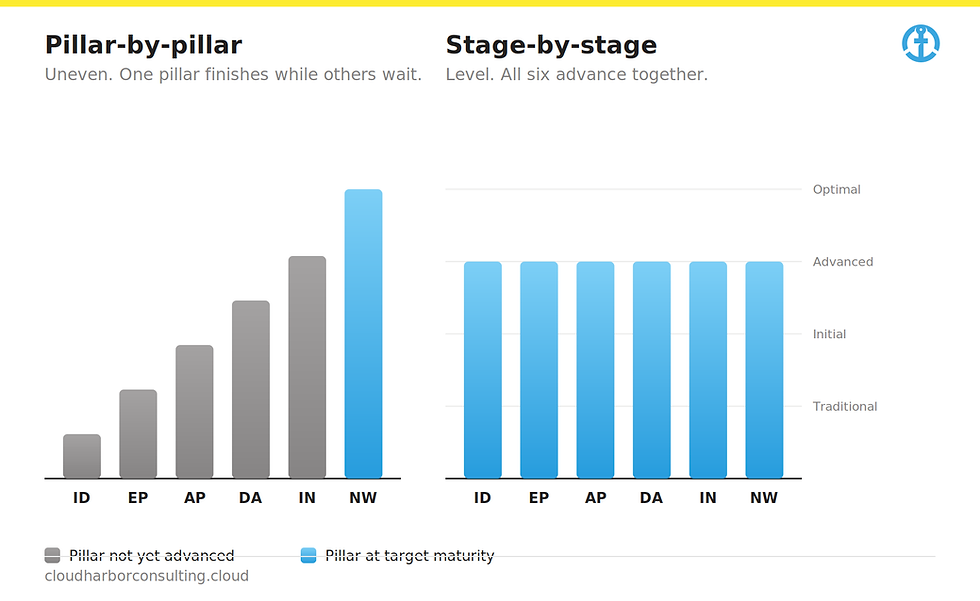
Pillar-by-pillar means finishing identity, then moving to endpoints, then data, and so on. It's easier to staff and shows incremental progress one pillar at a time.
Stage-by-stage means moving all six pillars forward together through the same maturity level before any of them advances to the next. CISA's Zero Trust Maturity Model v2.0, a public scale used to measure Zero Trust progress, defines four of those levels: Traditional, Initial, Advanced, and Optimal. No pillar is allowed to get ahead of the others.
Pillar-by-pillar creates a specific problem: a fully mature identity pillar sitting next to endpoints still at the Traditional stage means strong identity controls can't protect data that unmanaged endpoints can still reach.
Stage-by-stage avoids that gap by design. It's the same reason Cloud Harbor's Zero Trust Readiness Assessment framework scores a tenant that way: pillar score first, then an overall score from the median of all six, so one strong pillar can't hide five weak ones.
What getting the sequence wrong costs
Each trade-off above carries a business consequence alongside the technical one.
Broad policies that can't except cleanly get weakened under pressure, and a weakened policy protects fewer people than the one you told leadership you'd deployed.
A watch-first window that runs too long leaves a measured gap between "we require compliant devices" and "that requirement is actually enforced," and that gap is exactly what gets asked about after an incident.
DLP written ahead of classification trains users to dismiss alerts, so by the time classification catches up and the policy would actually be accurate, the audience that was supposed to respond to it has already tuned it out.
Pillar-by-pillar sequencing can look mature in a board deck, since the identity slide is finished. The blast radius of an incident is set by whichever pillar got left for last.
None of this is extra work. It's the same work, and the order determines whether it compounds or collides.
A decision checklist for each pillar
Before choosing an approach on any of the five points above, run three questions:
What's the minimum viable control? Not the ideal end state. The smallest change that closes the largest gap right now.
What's the friction cost? Who feels this in week one, and do they know it's coming before it happens?
What's the audit requirement? If this control is ever the subject of a question after an incident, what does the evidence trail need to show?
Answer all three before picking broad or persona-scoped, block or watch-first, classify-first or DLP-first, automate or queue. The answers won't be the same for every organization, and they shouldn't be. That's what makes this a decision framework.
Is your Zero Trust architecture 5 controls, or 1 build?
Cloud Harbor Consulting partners with security architects and CISOs to turn a tenant where every pillar has controls switched on into one where the 5 decisions underneath them, identity scope, endpoint sequencing, data classification order, SecOps automation boundaries, and pillar rollout order, actually cohere. Schedule a conversation to run your current architecture through the decision framework and sequencing model covered in this piece, and pinpoint where a broad Conditional Access policy is waiting on a persona exception that was never built, a legacy device population never made it into the compliance inventory before enforcement went live, or one mature pillar is resting on 5 that never advanced past Traditional, the same gap your last architecture review assumed was already closed.

Comments