Zero Trust Is Not a Product — It’s a Decision Framework (Microsoft 365 as the Reference Implementation)

The breach didn’t start with malware. It started with a perfectly valid sign-in.
That’s not a dramatic opening line. It’s a description of how modern incidents actually unfold: credentials work, sessions look legitimate, and the organization only realizes something is wrong after access has already been granted and actions have already happened.
This is where Zero Trust gets misread.
When leaders treat Zero Trust like a shopping list— “buy the Microsoft security stack and we’re done”—they optimize procurement. When they treat it like a decision framework, they optimize outcomes: fewer unauthorized access paths, smaller blast radius, faster containment, and cleaner compliance defensibility.
This post uses Microsoft 365 as the reference implementation because Cloud Harbor Consulting works inside Microsoft 365 every day, and because Microsoft provides an end-to-end approach for applying Zero Trust principles across identity, endpoints, apps, data, and security operations.

2-Minute Executive Summary (for CEOs, CFOs, CCOs, and board members)
What Zero Trust is (one sentence)
A repeatable way to decide who gets access to what—under which conditions—every time, and to keep re-evaluating that decision as risk changes. Not a one-time product purchase.
Financial Lens (cost control + risk reduction)
Zero Trust lowers cost by reducing the probability that a credential compromise becomes a business-disrupting incident and by reducing the scope of damage when something goes wrong.
The mechanism is straightforward:
Stronger access decisions reduce unauthorized access paths.
Least privilege—operationalized as Just-In-Time and Just-Enough-Access, with risk-based adaptive policies and data protection—limits blast radius.
“Assume breach” ensures you can detect and contain faster—meaning fewer systems to remediate and fewer hours spent in recovery.
Compliance Lens (defensibility + audit posture)
Zero Trust improves compliance defensibility by making access controls intentional, consistent, and auditable.
In Microsoft 365, that includes clear identity and device access decisions, plus data controls (classification, sensitivity labeling, and DLP) that demonstrate you can identify sensitive information, apply protection, and prevent oversharing—not just “hope users do the right thing.”
Microsoft 365 as the reference implementation (high-level)
Microsoft Entra is where access decisions are made—Conditional Access is the policy engine, and Microsoft Entra ID is the policy decision point.
Microsoft Intune is where device compliance is defined; that compliance state becomes a Conditional Access signal.
Microsoft Purview implements data guardrails (sensitivity labels with optional encryption and rights management, DLP, and Microsoft Purview Insider Risk Management).
Microsoft Defender XDR + Microsoft Sentinel—surfaced together in the Microsoft Defender portal as unified security operations—operationalize “assume breach.”
How leadership tracks progress (without turning it into a vanity score)
Executives can track three things that translate into outcomes:
Coverage of core policies and guardrails (identity, devices, apps, data).
Exception rate and exception governance (how often you bypass your own rules—and who approves that risk).
Response readiness (visibility + repeatable response when trust degrades).

Start with the story: a “valid sign-in” crosses four decisions (illustrative)
Let’s take the “perfectly valid sign-in” and use it as the thread for the entire article—without inventing a client story.
Illustrative sequence (not a client incident):
A sign-in succeeds. (Identity decision)
The session comes from an unmanaged or unhealthy endpoint. (Device decision)
The identity accesses a high-value cloud application. (App decision)
The session touches sensitive data. (Data decision)
Your detection and response layer determines whether this is a contained event—or a costly incident. (SecOps decision)
Zero Trust is the discipline of making those decisions consistently—and then validating them continuously as risk changes. In Microsoft’s model, that continuous validation isn’t a metaphor: Continuous Access Evaluation re-checks tokens in near real time when user, device, or network risk changes, so a session that was trusted a minute ago can be revoked the moment risk shifts.

Zero Trust, defined the Microsoft way (and why the principles matter)
Microsoft frames Zero Trust around three guiding principles:
Verify explicitly
Use least privilege access (Just-In-Time and Just-Enough-Access, risk-based adaptive policies, and data protection)
Assume breach
These aren’t slogans. They’re constraints you apply across your environment so “trust” becomes something you prove, not something you assume.
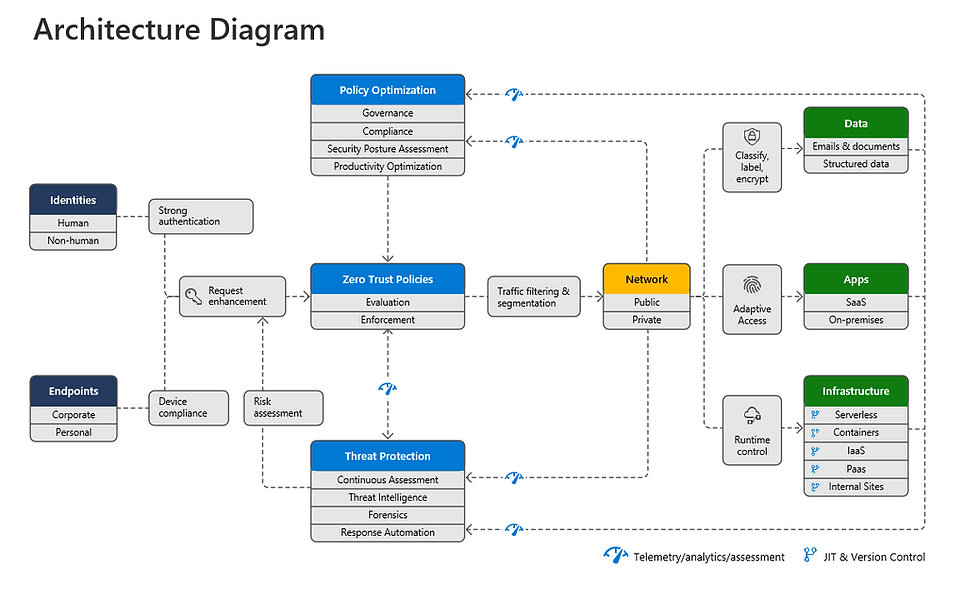
Microsoft’s Microsoft 365 deployment plan reinforces the architecture: security policy enforcement sits at the center, coordinating identities, devices, data, apps, and other components under a single strategy.
The framework: four decisions you must standardize (and where Microsoft 365 enforces them)
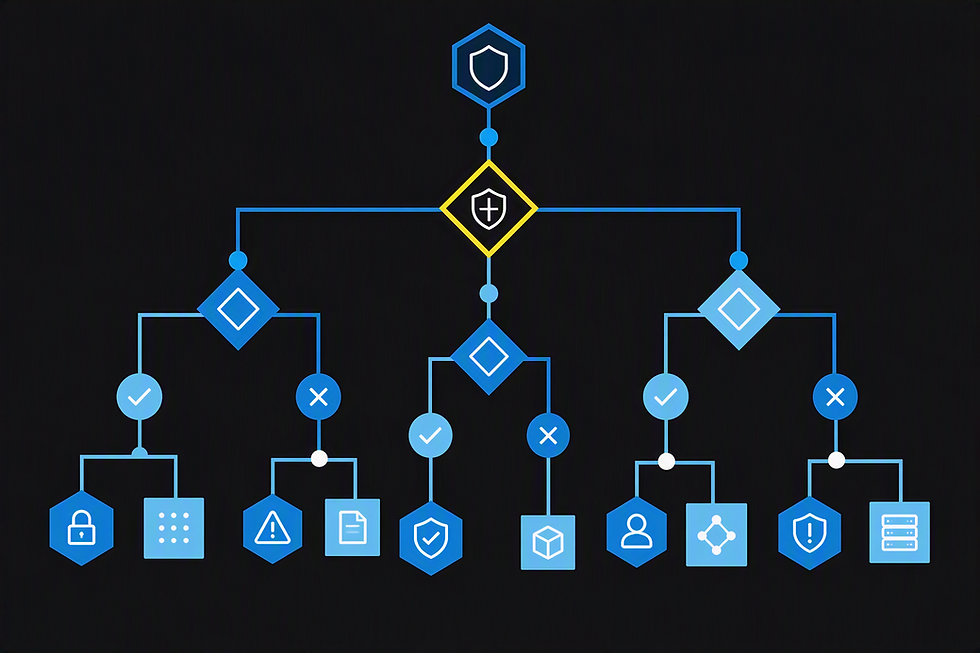
Here’s the core idea that keeps Zero Trust from turning into a tool catalog:
Can we trust the identity? (Microsoft Entra)
Can we trust the device? (Intune + device posture)
What data and app actions are allowed? (Apps + Purview guardrails)
What happens when trust degrades? (Defender portal: Defender XDR + Sentinel)
This structure lets you talk to engineers and executives at the same time:
Engineers map decisions to enforcement points.
Executives map decisions to cost, risk, and defensibility.
A note on scope: Microsoft’s full Zero Trust model defines seven technology pillars—six signal sources (Identities, Endpoints, Data, Apps, Infrastructure, Network) plus a seventh that provides visibility, automation, and orchestration. The four decisions above are an executive simplification optimized for Microsoft 365 conversations. Infrastructure and Network are real Zero Trust pillars, and any organization with significant on-prem, hybrid, or multicloud footprint should plan for them explicitly. Microsoft’s newer Zero Trust Workshop has extended the model further to include SecOps and AI as their own pillars.

Pillar 1 — Identity: Microsoft Entra makes the access decision
If a modern incident starts with a valid sign-in, identity is where Zero Trust starts earning its keep.
In Microsoft’s model, policy enforcement is central to Zero Trust. In the Microsoft ecosystem, Microsoft Entra ID acts as the policy decision point, and Conditional Access is the policy engine—the place where identity signals become access decisions.
What “verify explicitly” means in real life
It means you don’t grant access based on “the password was correct.” You grant access based on context:
Who is signing in?
From what conditions?
To what resource?
With what risk signals available?
In practice, that’s a stack of capabilities working together:
Risk-based Conditional Access powered by Microsoft Entra ID Protection (sign-in risk, user risk) so policy is adaptive, not static.
Continuous Access Evaluation so tokens are re-evaluated when risk changes—directly addressing the “valid sign-in that shouldn’t still be valid” problem.
Phishing-resistant MFA (FIDO2, Windows Hello, certificate-based) and token protection for the stolen-session scenarios that defeat password-only or SMS-based MFA.
Privileged Identity Management for just-in-time admin elevation—the operational expression of least privilege for high-impact roles.
Common failure pattern (identity)
Policies exist, but exclusions and exceptions quietly grow until the policy only protects the “easy” cases. This is how “we require MFA” turns into “we require MFA… except when it’s inconvenient.”
Financial + compliance consequence
Identity is where high-cost incidents begin. Strong identity decisions reduce the likelihood of unauthorized access becoming an incident with containment costs, legal exposure, customer communication, and operational disruption.
From a defensibility standpoint, consistent identity decisions are evidence that access controls are intentional—not accidental.

Pillar 2 — Endpoints: Intune turns device posture into an access prerequisite
Zero Trust doesn’t end at “who.” It includes “from what.”
Microsoft’s pillar guidance highlights endpoints as a major attack surface and emphasizes monitoring and enforcing device health and compliance for secure access.
In the Microsoft 365 deployment plan, Intune is where you enroll devices and define compliance policies, and the resulting compliance state becomes a Conditional Access signal—so access decisions can require healthy devices for sensitive apps and data. Endpoint telemetry from Microsoft Defender for Endpoint feeds into the same picture, raising risk levels when a device shows signs of compromise.
Common failure pattern (endpoints)
Devices are “managed,” but sensitive apps and data remain accessible from unmanaged or unhealthy devices because access policies aren’t tied to device posture. In practice, this is one of the easiest ways to unintentionally accept more risk than leadership believes they’ve accepted.
Financial + compliance consequence
If a compromised identity can operate from any device, you’ve widened the blast radius.
Restricting high-value access to healthy devices is cost control: fewer systems touched, fewer records exposed, fewer remediation hours. It also supports compliance defensibility because it shows access is conditional on posture—not just identity.

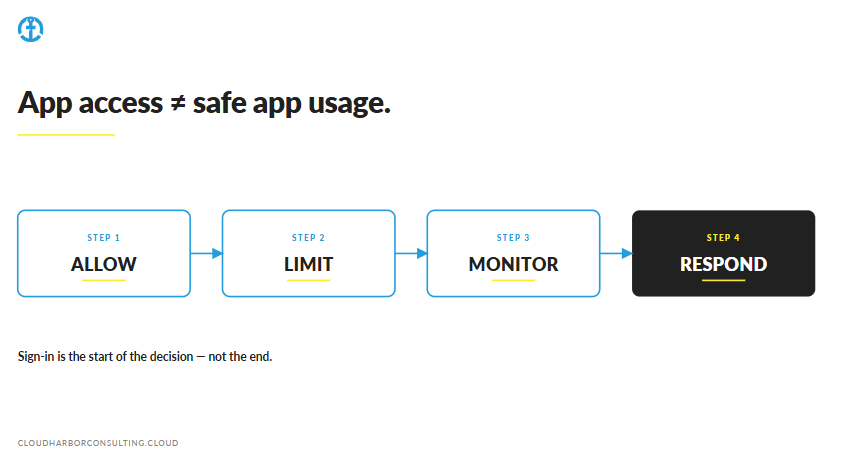
Pillar 3 — Apps: access to an application isn’t the same as safe usage
Many organizations treat “app security” as “we use SSO.” That’s necessary. It’s not sufficient.
Microsoft’s app pillar guidance emphasizes discovering shadow IT, ensuring appropriate permissions, gating access based on analytics, monitoring abnormal behavior, controlling user actions, and validating secure configuration options.
Common failure pattern (apps)
App access is controlled at sign-in, but app actions and risky patterns aren’t monitored or constrained. The “valid sign-in” can still become mass download, unusual access patterns, or abnormal app activity if you’re not watching behavior and permissions.
Financial + compliance consequence
Applications often carry workflow permissions that directly affect revenue operations and regulated data.
If you can’t explain “who accessed what app and what they did,” you’ll struggle to contain incidents quickly and to demonstrate defensible controls during audits or post-incident reviews.
Pillar 4 — Data: Microsoft Purview creates defensible guardrails
This is where compliance and financial impact meet.
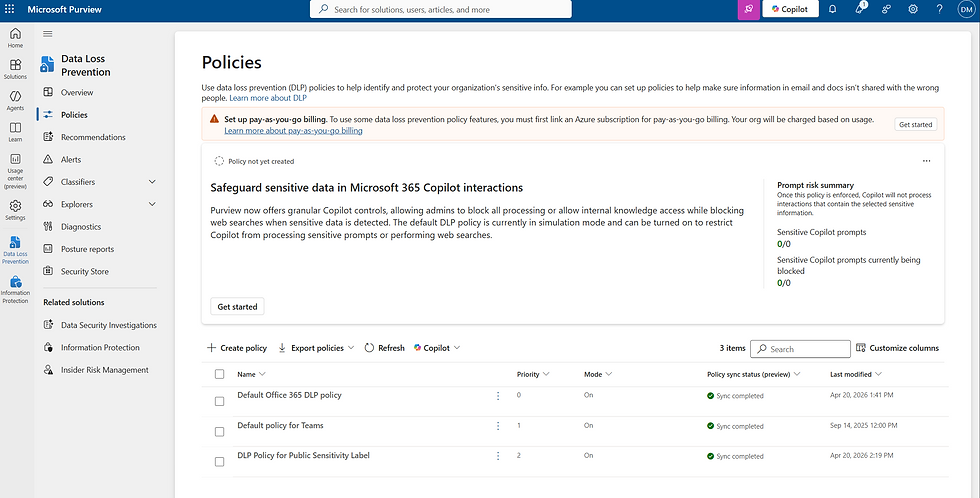
Microsoft’s Purview guidance frames Zero Trust data protection around core capabilities:
Data classification (know your data)
Sensitivity labels with optional encryption (rights management) and content markings
Data Loss Prevention (DLP) (prevent oversharing)
Microsoft Purview Insider Risk Management (identify risky patterns)—including Adaptive Protection, which dynamically tightens DLP and access controls for users whose risk score rises
Data Security Posture Management (DSPM)—and increasingly DSPM for AI—so you know where sensitive content lives and how it’s being used by the AI tools your business is adopting
Common failure pattern (data)
Data protection is often attempted without mature classification and labeling. The result is either (a) noisy policies that frustrate users, or (b) weak policies that don’t protect what matters. Either outcome reduces defensibility.
Financial + compliance consequence
From a cost-control standpoint, labeled and protected data reduces the impact of a compromised identity because controls can follow the data and risky sharing can be blocked or challenged.
From a compliance standpoint, the ability to classify, protect, and prevent oversharing is exactly what “defensible controls” look like when auditors ask how sensitive information is governed.

Visibility, automation, and orchestration: the difference between an event and an incident
Zero Trust fails quietly when organizations can’t see when trust degrades.
Microsoft’s answer is unified security operations, surfaced in the Microsoft Defender portal. Two products do the work behind that experience:
Microsoft Defender XDR automatically collects, correlates, and analyzes signal, threat, and alert data across users, identities, devices, apps, and emails.
Microsoft Sentinel—now generally available inside the Defender portal—delivers SIEM and SOAR capabilities alongside XDR, so analysts work from one queue instead of two.
What “assume breach” looks like operationally
It means you plan for detection and response as part of the design:
Visibility across users, identities, devices, apps, and emails (and, via Defender for Cloud, into multicloud and hybrid infrastructure)
Correlation of signals into unified incidents
Repeatable response workflows, with automation rules and playbooks where appropriate
Common failure pattern (SecOps)
Telemetry exists, but response is manual and inconsistent. Different people take different actions for the same alert type, which increases dwell time and cost. Over time, this becomes alert fatigue—and executives end up funding tools without funding outcomes.
Financial + compliance consequence
Faster detection and consistent containment reduces the number of systems impacted and the hours required to remediate—directly affecting recovery cost.
It also improves compliance defensibility because response actions and investigations are more consistent and auditable.


How leadership tracks progress (practical and board-friendly)
A practical executive progress model looks like this:
Coverage: Are core decisions enforced across identity, devices, apps, and data?
Exceptions: How many bypasses exist, and who approves/owns them?
Response readiness: Can we detect and contain consistently when trust degrades?

Practical takeaway: the Microsoft 365 Zero Trust decision checklist
If you want a quick test of whether your organization is “buying tools” or “making Zero Trust decisions,” use this checklist.
Verify explicitly
Do we evaluate meaningful access signals consistently—or do we rely on “password correct = trusted”?
Are high-value resources protected by clear, intentional access conditions, with risk-based Conditional Access and Continuous Access Evaluation re-checking sessions when risk changes?
Are administrative roles elevated just-in-time (PIM), and is MFA phishing-resistant for the people and systems that matter most?
Use least privilege access
Is access intentionally limited to what’s needed, when it’s needed (JIT/JEA)?
Is sensitive data protected with sensitivity labels and DLP, and is risky behavior tightened automatically through Adaptive Protection?
Assume breach
Do we have unified visibility and correlation across users, identities, devices, apps, and emails so incidents are detected early?
Do we have repeatable response workflows—Defender XDR for correlation, Sentinel automation rules and playbooks for containment—so response is consistent and auditable?
Conclusion: Zero Trust is decision governance—Microsoft 365 is how you enforce it
Zero Trust isn’t a product category. It’s the discipline of making consistent access decisions—and continuously validating those decisions as risk changes.
Microsoft provides both the principles and a complete Microsoft 365 deployment plan to operationalize them across identity, endpoints, apps, data, and unified security operations.
And for executives, the message is simple:
Financial Lens: reduce the likelihood and cost of incidents by limiting unauthorized access paths and blast radius.
Compliance Lens: improve defensibility by proving sensitive data is identified, protected, and governed with consistent enforcement.
Practitioner question: What’s the most common “decision gap” you see in Microsoft 365 Zero Trust programs—identity, devices, data, or response?
Do You Know What Your Coverage, Exceptions, and Response Signals Are Telling You?
Cloud Harbor Consulting partners with technical leadership teams to translate Zero Trust into measurable decisions across Microsoft 365. Schedule a conversation to baseline your three signals and pinpoint where enforcement is silently breaking down.


Comments