Why Entra ID Conditional Access Fails in Practice (And How to Fix It)

Updated: Apr 16
The breach didn't start with malware. It started with a perfectly valid sign-in.
That's the uncomfortable truth behind many identity incidents I see in real environments. Conditional Access was enabled. MFA was enforced. Policies existed. And yet the attacker still walked in through the front door.
Not because Microsoft Entra ID failed — but because Conditional Access was treated like a feature instead of a risk-reduction system.
This article explains why Conditional Access fails in practice, the patterns that show up repeatedly in production environments, and how organizations actually fix it — without rebuilding everything from scratch.
Conditional Access Is Not a Feature — It's a Risk Reduction System
Conditional Access is often described as policy-based access control. Technically, that's correct. Practically, it misses the point.
Conditional Access is Microsoft's Zero Trust policy engine. Every sign-in is evaluated against a set of signals including:
Identity — who is signing in, and are they high-risk?
Device state — is the device compliant, hybrid-joined, or unknown?
Location — named location, country, or IP range
Risk — sign-in risk and user risk from Entra ID Identity Protection
Application or action — what the identity is trying to access or do
Based on those signals, a decision is made: allow, block, or challenge.
For security engineers, this means:
Policy interaction matters more than policy count
Coverage gaps matter more than control strength
Exclusions are architectural decisions, not conveniences
For executives, it means something simpler:
Conditional Access doesn't eliminate risk — it reduces likelihood, blast radius, and dwell time
Poor Conditional Access design creates a false sense of security
"We have Conditional Access" is not a defensible risk position

Failure Pattern #1: Over-Broad Exclusions (The "Temporary" That Became Permanent)
Exclusions are the fastest way to neutralize an otherwise strong Conditional Access strategy.
I recently worked with a client undergoing an acquisition. As part of the integration plan, acquired users were excluded from Conditional Access until device onboarding into Intune and Active Directory could be completed.
The intent was temporary. The impact was structural.
This created an unprotected identity plane:
Users authenticating from unmanaged devices
No device trust or compliance signal
No phishing-resistant MFA
No meaningful risk enforcement
What made this especially dangerous was that secure alternatives already existed. Azure Virtual Desktop and Windows 365 — both governed by Conditional Access — could have provided controlled, policy-enforced access during the transition. Instead, exclusion became the access strategy.
From a business perspective:
One excluded group bypasses every downstream security investment
Attackers don't defeat Conditional Access — they avoid it
Temporary exclusions often outlive the project that created them

Failure Pattern #2: Conditional Access That Protects Apps, Not Identity
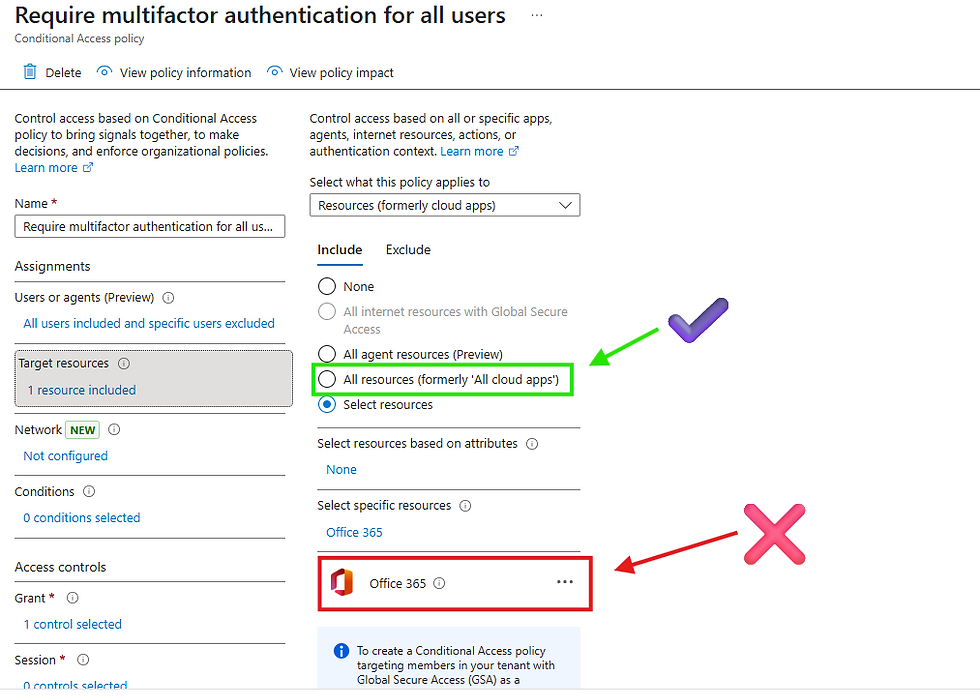
Another common failure is scoping Conditional Access narrowly — often to "Office 365" — while leaving identity infrastructure exposed.
Modern attacks don't start with applications. They start with identity, then expand:
Azure management APIs — the control plane for your Azure environment
Microsoft Azure PowerShell and CLI — automation and scripting endpoints
Microsoft Admin Portals — configuration and tenant management
Underlying Microsoft services — Exchange, SharePoint, Teams at the API level
When Conditional Access protects apps but not identity actions and management APIs, attackers can gain control-plane access without triggering the policies leadership believes are doing the work.
Key distinction: Scoping policies to "All cloud apps" is the most comprehensive coverage model. Narrowly scoping to specific apps — especially only productivity apps — leaves management surfaces unprotected.
From a risk perspective, this matters:
App protection limits data exposure
Identity and management protection limits everything else
Failure Pattern #3: MFA Fatigue Isn't an MFA Problem — It's a Design Problem
When MFA fatigue attacks succeed, MFA often gets blamed. In practice, the failure is architectural.
MFA without context is friction — not security.
If a user can authenticate:
From an unmanaged device
From an unfamiliar or high-risk location
Without enforced risk evaluation
Using push notifications alone, without requiring phishing-resistant methods
…then MFA becomes a timing challenge, not a control.
Important update: Microsoft mandated number matching for Authenticator push notifications in May 2023, which significantly raises the bar for classic MFA fatigue attacks. However, the architectural gap remains: MFA without device, location, and risk conditions can still be undermined through adversary-in-the-middle (AiTM) phishing and session token theft. The answer is Authentication Strengths — a Conditional Access grant control that lets you require specifically phishing-resistant MFA methods (FIDO2 security keys, passkeys, Windows Hello for Business, or certificate-based authentication) for sensitive apps and workloads.
From an executive standpoint, this matters because:
These sign-ins appear legitimate in logs
Detection is delayed
Incident scope expands before containment begins

Failure Pattern #4: No Validation, No Monitoring, No Ownership
Even well-designed Conditional Access environments degrade over time.
Applications change. Authentication flows evolve. Business exceptions accumulate. Without validation and ownership, Conditional Access quietly loses effectiveness.
One question exposes this immediately:
"Who owns Conditional Access outcomes — not just policies?"
Warning signs include:
No routine review of sign-in logs or Conditional Access policy reports
No alerting on policy bypass, failure, or Report-only mode policies that were never promoted
No impact analysis when policies change or new apps are added
Exclusions that were added months ago and never reviewed

How to Fix Conditional Access (Without Rebuilding Everything)
In real environments, fixing Conditional Access does not start with new policies. It starts with understanding the current state.
Step 1: Assess the Current State
Inventory all Conditional Access policies — including Report-only and disabled ones
Identify exclusions, legacy authentication paths, and uncovered workloads
Review sign-in logs to understand real access behavior, not assumed behavior
Step 2: Discover Gaps and Risk Paths
This is where the real value appears:
Which identities authenticate without device trust?
Which apps or management surfaces fall outside Conditional Access enforcement?
Where is risk evaluated but not enforced — or not evaluated at all?
Where are phishing-resistant MFA methods not required?
Step 3: Establish a Secure Baseline
A defensible baseline typically includes:
Identity-wide Conditional Access coverage — no orphaned identities or apps
No standing exclusions — only controlled, time-bound access paths
Layered signals — device, location, and risk aligned to real attack paths
Authentication Strengths — enforcing phishing-resistant MFA for privileged and high-value workloads
As you establish a secure baseline, start with these five (5) or six (6) policies:
Block legacy authentication
Require MFA for all users
Require device compliance for sensitive apps
Require phishing-resistant MFA for privileged accounts
Require phishing-resistant MFA for privileged roles
Enforce risk-based step-up for medium-or-high-risk sign-ins
For environments operating beyond this baseline, Continuous Access Evaluation and Token Protection close the session token gap that static Conditional Access policies leave open.
Until this baseline exists, adding more Conditional Access policies increases complexity without materially reducing risk.

The Executive Translation: What Conditional Access Buys You in the Boardroom
CIOs and CISOs don't buy Conditional Access because it's elegant. They buy it because they have to stand in front of a board and explain outcomes.
Board conversations usually revolve around:
Why incident counts went up or down
Why a breach was contained — or wasn't
Whether security investments changed the result
According to IBM's Cost of a Data Breach Report, credential-based breaches are among the costliest incident types — and identity remains the leading initial attack vector year after year. Incidents that begin with compromised credentials carry significantly higher investigation, remediation, and downtime costs compared to those detected early or contained quickly.
Strong Conditional Access design changes the narrative:
Entire classes of identity attacks are prevented, or
Incidents are detected earlier and contained faster
What executives actually buy:
Fewer incidents that require a breach notification
Faster time-to-contain when an incident does occur
Audit-defensible evidence that controls were in place
Conditional Access doesn't just protect identity. It protects credibility.
Conditional Access Didn't Fail — Expectations Did
Conditional Access works. I've seen it stop real attacks in real environments.
But it only works when treated as architecture, not configuration. As a system, not a setting. As a risk reducer, not a checkbox.
If your Conditional Access strategy is defined by exclusions, exceptions, or "temporary" decisions — the control didn't fail. Expectations did.
Is Your Conditional Access Strategy Actually Working?
Most environments have Conditional Access policies. Few have a Conditional Access strategy. Cloud Harbor Consulting helps organizations assess coverage gaps, eliminate standing exclusions, and build an identity baseline that holds up under real attack conditions — not just in theory.


Comments